Exhibit (a)(1)(C)
Exhibit (a)(1)(C) PARTICIPATION INSTRUCTIONS VISA INC. CLASS B STOCK EXCHANGE OFFER C) MAKEWHOLE AGREEMENT – PARENT GUARANTOR VISA 1 PARTICIPATION INSTRUCTIONS VISA INC. CLASS B STOCK EXCHANGE OFFER A) LETTER OF TRANSMITTAL VISA
INDEX IMPORTANT INFORMATION 3 ACCESSING THE LETTER OF TRANSMITTAL 4 REVIEWING & COMPLETING THE LETTER OF TRANSMITTAL 6 SUBMITTING THE LETTER OF TRANSMITTAL 10 TRACKING YOUR SUBMISSIONS 11 ACCESSING THE MAKEWHOLE AGREEMENT 12 SENDING INVITATION TO THE MAKEWHOLE AGREEMENT 13 REVIEWING & COMPLETING THE MAKEWHOLE AGREEMENT 14 SUBMITTING THE MAKEWHOLE AGREEMENT 17
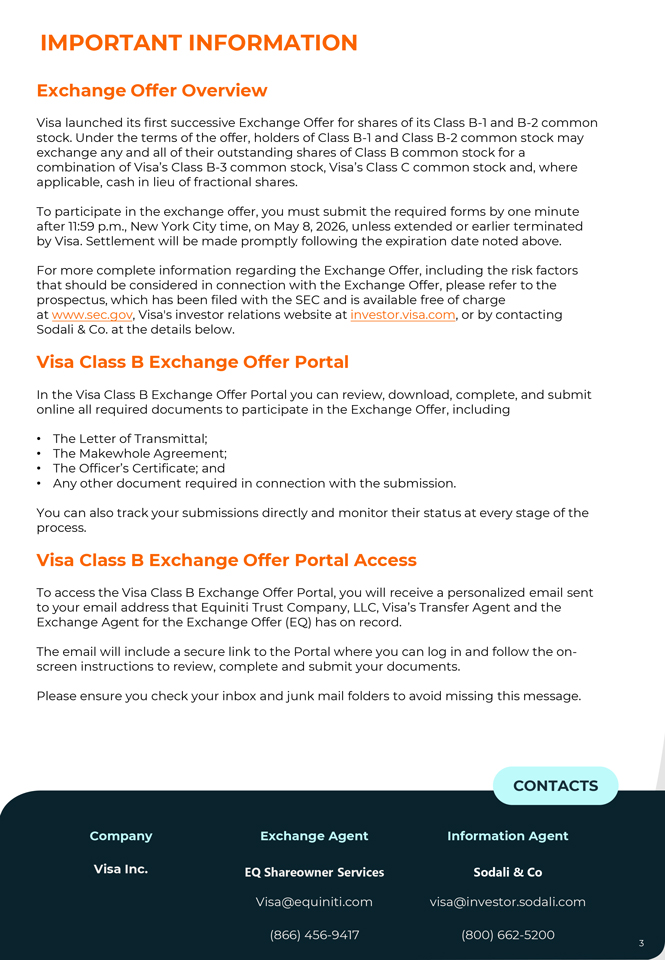
IMPORTANT INFORMATION Exchange Offer Overview Visa launched its first successive Exchange Offer for shares of its Class B-1 and B-2 common stock. Under the terms of the offer, holders of Class B-1 and Class B-2 common stock may exchange any and all of their outstanding shares of Class B common stock for a combination of Visa’s Class B-3 common stock, Visa’s Class C common stock and, where applicable, cash in lieu of fractional shares. To participate in the exchange offer, you must submit the required forms by one minute after 11:59 p.m., New York City time, on May 8, 2026, unless extended or earlier terminated by Visa. Settlement will be made promptly following the expiration date noted above. For more complete information regarding the Exchange Offer, including the risk factors that should be considered in connection with the Exchange Offer, please refer to the prospectus, which has been filed with the SEC and is available free of charge at www.sec.gov, Visa’s investor relations website at investor.visa.com, or by contacting Sodali & Co. at the details below. Visa Class B Exchange Offer Portal In the Visa Class B Exchange Offer Portal you can review, download, complete, and submit online all required documents to participate in the Exchange Offer, including • The Letter of Transmittal; • The Makewhole Agreement; • The Officer’s Certificate; and • Any other document required in connection with the submission. You can also track your submissions directly and monitor their status at every stage of the process. Visa Class B Exchange Offer Portal Access To access the Visa Class B Exchange Offer Portal, you will receive a personalized email sent to your email address that Equiniti Trust Company, LLC, Visa’s Transfer Agent and the Exchange Agent for the Exchange Offer (EQ) has on record. The email will include a secure link to the Portal where you can log in and follow the on-screen instructions to review, complete and submit your documents. Please ensure you check your inbox and junk mail folders to avoid missing this message. CONTACTS Company Exchange Agent Information Agent Visa Inc. EQ Shareowner Services Sodali & Co Visa@equiniti.com visa@investor.sodali.com (866) 456-9417 (800) 662-5200
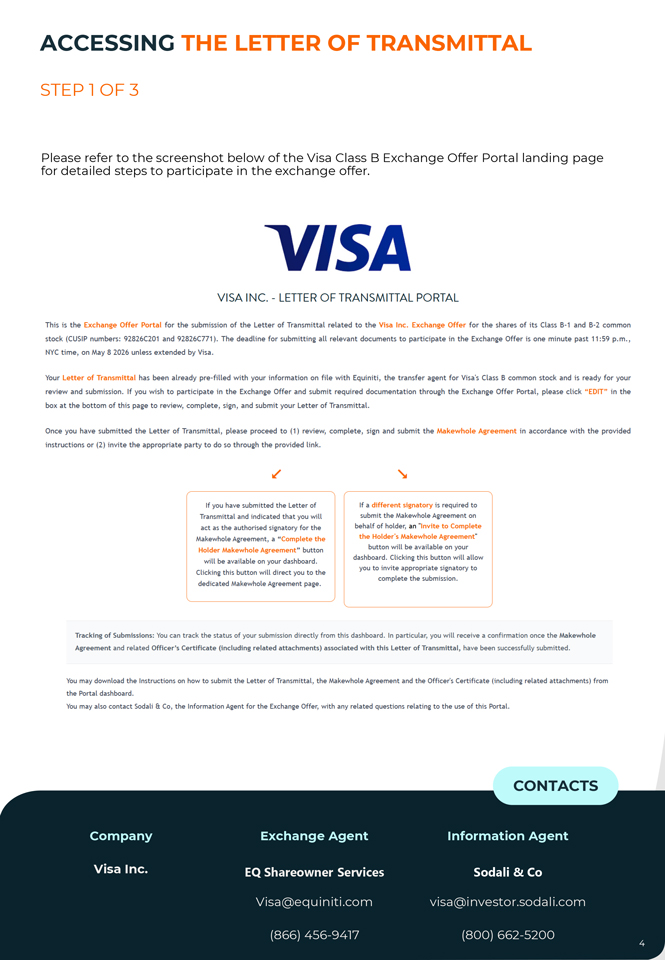
ACCESSING THE LETTER OF TRANSMITTAL STEP 1 OF 3 for Please detailed refer steps to the to screenshot participate below in the of exchange the Visa Class offer .B Exchange Offer Portal landing page VISA VISA INC.—LETTER OF TRANSMITTAL PORTAL This is the Exchange Offer Portal for the submission of the Letter of Transmittal related to the Visa Inc. Exchange Offer for the shares of its Class B-1 and B-2 common stock (CUSIP numbers: 92826C201 and 92826C771). The deadline for submitting all relevant documents to participate in the Exchange Offer is one minute past 11:59 p.m. , NYC time, on May 8 2026 unless extended by Visa. Your Letter of Transmittal has been already pre-filled with your information on file with Equiniti, the transfer agent for Visa’s Class B common stock and is ready for your review and submission. If you wish to participate in the Exchange Offer and submit required documentation through the Exchange Offer Portal, please click “ EDIT” in the box at the bottom of this page to review, complete, sign , and submit your Letter of Transmittal. Once you have submitted the Letter of Transmittal, please proceed to (1) review, complete, sign and submit the Makewhole Agreement in accordance with the provided instructions or (2) invite the appropriate party to do so through the provided link. If you have submitted the Letter of If a different signatory is required to Transmittal and indicated that you will submit the Makewhole Agreement on act as the authorised sienatory for the behalf of holder, an “Invite to Complete the Holder’s Makewhole Agreement” Makewhole Agreement, a “Complete the button will be available on your Holder Makewhole Agreement “ button dashboard. Clicking this button will allow will be available on your dashboard. Clicking this button will direct you to the you to invite appropriate sienatory to dedicated Makewhole Agreement page. complete the submission. Tracking of Submissions: You can track the status of your submission directly from this dashboard. In particular, you will receive a confirmation once the Makewhole Agreement and related Officer’s Certificate (including related attachments) associated with this Letter of Transmittal, have been successfully submitted. You may download the Instructions on how to submit the Letter of Transmittal, the Makewhole Agreement and the Officer’s Certificate (including related attachments) from the Portal dashboard. You may also contact Sodali a Co, the Information Agent for the Exchange Offer, with any related questions relating to the use of this Portal. CONTACTS Company Exchange Agent Information Agent Visa Inc. EQ Shareowner Services Sodali & Co Visa@equiniti.com visa@investor.sodali.com (866) 456-9417 (800) 662-5200
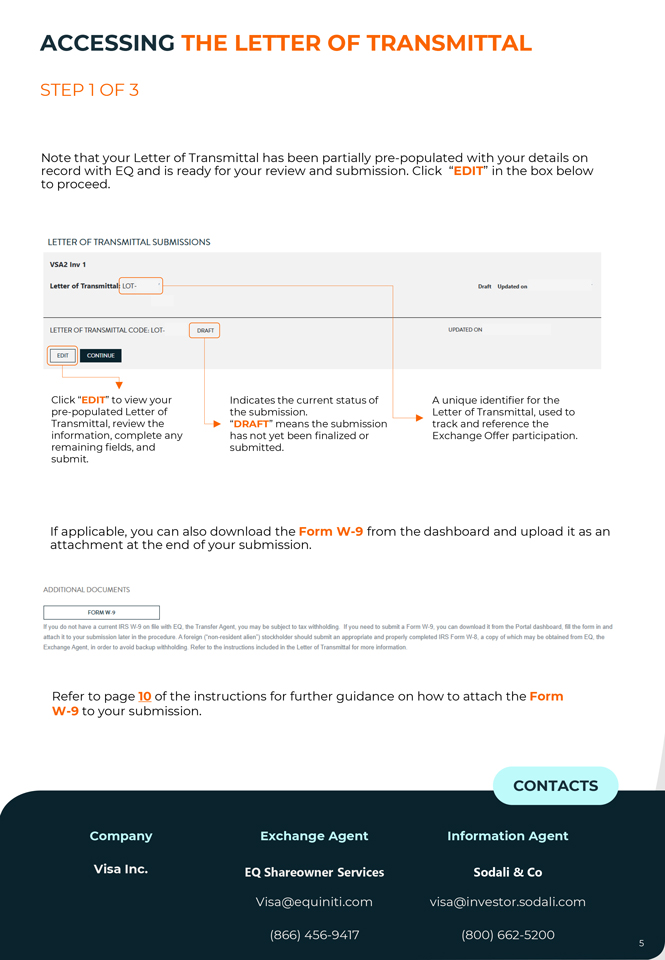
ACCESSING THE LETTER OF TRANSMITTAL STEP 1 OF 3 Note record that with your EQLetter and is of ready Transmittal for your has review been and partially submission. pre-populated Click “EDIT” within your the details box below on to proceed. LETTER O F TRANSMITTAL SU BM ISSIO NS VSA2 Inv 1 Letter of Transmittal LOT- Draft Updated on LETTER OF TRANSMITTAL CODE, LOT- DRAFT UPDATED ON EDIT CONTINUE Click “EDIT” to view your Indicates the current status of A unique identifier for the pre-populated Letter of the submission. Letter of Transmittal, used to Transmittal, review the “DRAFT” means the submission track and reference the information, complete any has not yet been finalized or Exchange Offer participation. remaining fields, and submitted. submit. If attachment applicable, at you the can end also of your download submission the Form . W-9 from the dashboard and upload it as an ADDITIONAL DOCUMENTS FORM W-9 If you do not have a current IRS W-9 on file with EQ, the Transfer Agent, you may be subject to tax withholding. If you need to submit a Form W-9, you can download it from the Portal dashboard, fill the form in and attach it to your submission later in the procedure. A foreign (“non-resident alien”) stockholder should submit an appropriate and property completed IRS Form W-8, a copy of which may be obtained from EO, the Exchange Agent, in order to avoid backup withholding. Refer to the instructions included in the Letter of Transmittal for more information. Refer to page 10 of the instructions for further guidance on how to attach the Form W-9 to your submission. CONTACTS Company Exchange Agent Information Agent Visa Inc. EQ Shareowner Services Sodali & Co Visa@equiniti.com visa@investor.sodali.com (866) 456-9417 (800) 662-5200 5
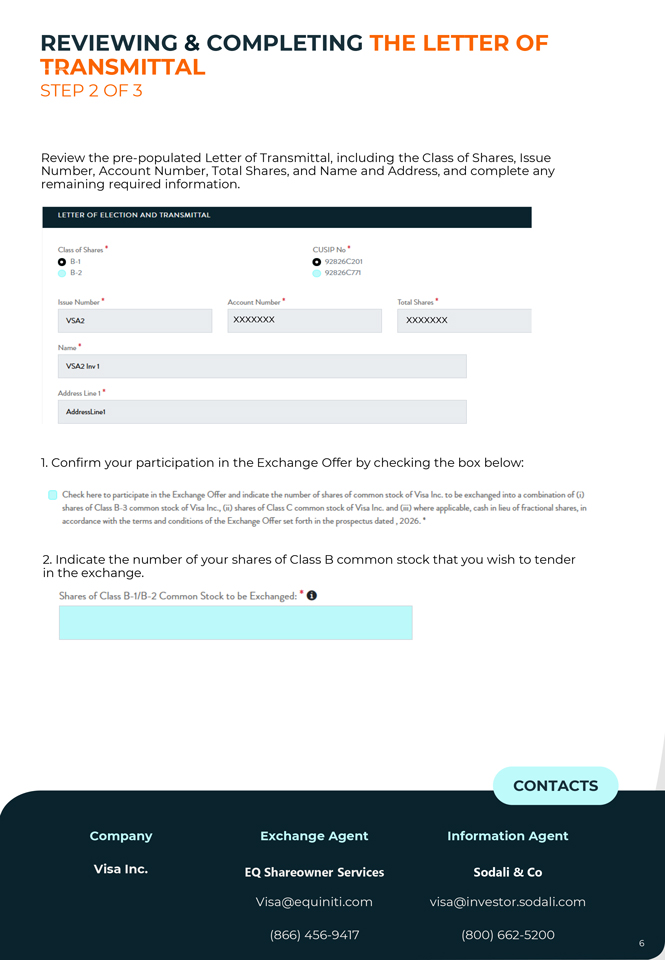
TRANSMITTAL REVIEWING & COMPLETING THE LETTER OF STEP 2 OF 3 Review Number, the Account pre-populated Number, Letter Total of Shares, Transmittal, and Name including and Address, the Class and of complete Shares, Issue any remaining required information. LETTER OF ELECT ION AND TRANSM ITTAL Class of Sha res • CUSIP No ‘ 0 B-1 0 92826C201 B-2 92826C771 Issue Number • Account Number • Total Shares • VSA2 xxxxxxx xxxxxxx Name * VSA2 lnv1 Address Line 1 • Address.Line 1 1. Confirm your participation in the Exchange Offer by checking the box below: Check f.ere to participate in the Exchange Offer and indicate the number of shares of common stock of Visa Inc. to be exchanged into a combination of{i) shares of Class B-3 common stock of Visa Inc., (ii) shares of Oass C oommon stock ofVisa Inc. and (iii) where applicable, cash in lietJ of fractional shares, in accordance with the terms and conditions of the !Exchange Offer set forth in the prospectus dated , 2026. ‘ in 2. Indicate the exchange the number . of your shares of Class B common stock that you wish to tender Shares of C lass B-1/B-2 Common Stock to be Exchanged: * 0 CONTACTS Company Exchange Agent Information Agent Visa Inc. EQ Shareowner Services Sodali & Co Visa@equiniti.com visa@investor.sodali.com (866) 456-9417 (800) 662-5200
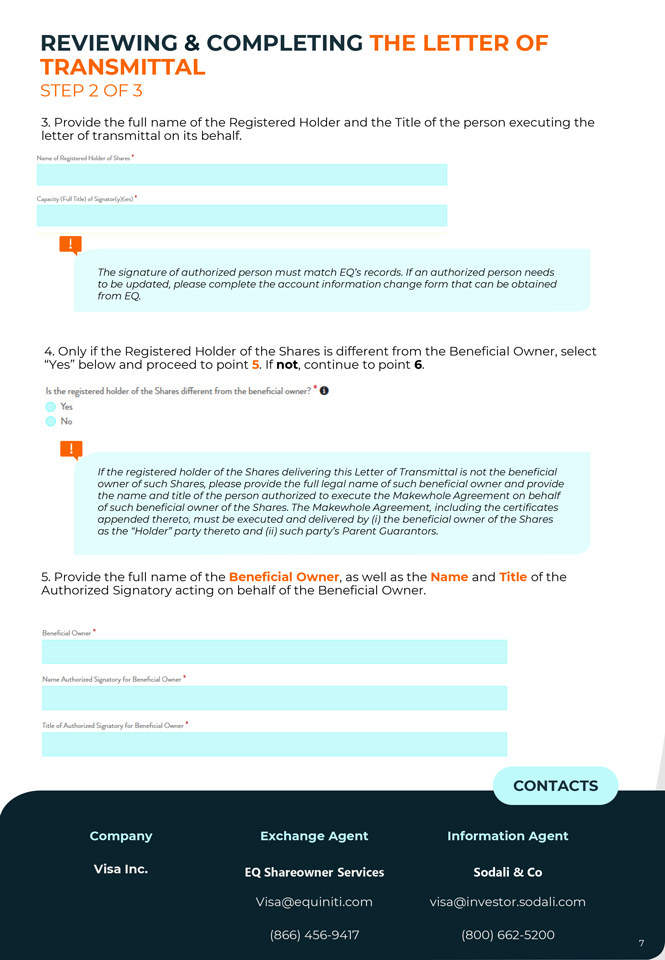
TRANSMITTAL REVIEWING & COMPLETING THE LETTER OF STEP 2 OF 3 3 letter . Provide of transmittal the full name on its of behalf the Registered . Holder and the Title of the person executing the Name of Registered Holder of Shares • Capacity Crull Title) of Signator(y)Ges) • The signature of authorized person must match EQ’s records. If an authorized person needs to be updated, please complete the account information change form that can be obtained from EQ. 4 “Yes” . Only below if the and Registered proceed Holder to point of 5 the . If not Shares , continue is different to point from 6 .the Beneficial Owner, select Is the registered holder of the ~flares different from the berteficial owr,er? • G Yes No If the registered holder of the Shares delivering this Letter of Transmittal is not the beneficial owner of such Shares, please provide the full legal name of such beneficial owner and provide the name and title of the person authorized to execute the Makewhole Agreement on behalf of such beneficial owner of the Shares. The Makewhole Agreement, including the certificates appended thereto, must be executed and delivered by (i) the beneficial owner of the Shares as the “Holder” party thereto and (ii) such party’s Parent Guarantors. 5 Authorized . Provide the Signatory full name acting of the on Beneficial behalf of the Owner Beneficial , as well Owner as the . Name and Title of the Beneficial Owner • Name Authorized Signatory for Beneficial Owner • Title of Authorized Signatory for Beneficial Owner • CONTACTS Company Exchange Agent Information Agent Visa Inc. EQ Shareowner Services Sodali & Co Visa@equiniti.com visa@investor.sodali.com (866) 456-9417 (800) 662-5200
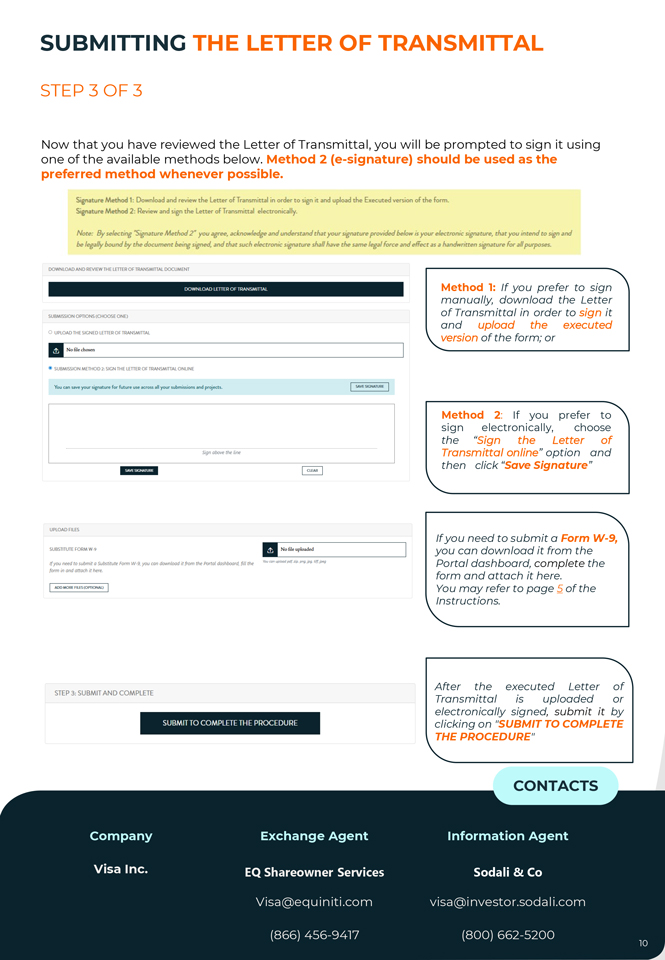
TRANSMITTAL REVIEWING & COMPLETING THE LETTER OF STEP 2 OF 3 6 undersigned, . Only if the cash select in “lieu Yes ” of below fractional and proceed shares should to point be 7 sent . If not, to a select party “ other No” and than continue the to point 8. Should the cash in lieu of fractional shares be sent to someone other than the undersigned or to a different address? • Yes No IQI To be completed ONLY if the cash in lieu of any fractional shares is to be sent to someone other than the undersigned or to the undersigned at an address other than that shown under “Shares of Class Common Stock to be Exchanged.” 7. Provide the full Name as well as the Address of the recipient including Zip Code. Mail To (Name): • G Address (Including Zip Code): • G 8 below . If you . If also you plan intend to submit to have the a third Makewhole party submit Agreement it on your yourself, behalf, please please check leave the the box box unchecked. Proceed to point 9. ·O 0 By did,i’III thi., you canlinn lhot y,:,u .... the Yl”“l”’”‘k sirmryfa.- the reci..m M.li:wholc ~and will &c ..mmitti1111 it in ..dotian to the letter of Transmittal 9 you . Once are satisfied you have with completed the information the form, provided, you may select save a “I draft have or read proceed and accepted with submission the . If Privacy Policy,” then click “Continue” to proceed to the review stage. 0 I have read and accept the PRIVACY POLICY SAVE AS DRAFT CONTINUE CONTACTS Company Exchange Agent Information Agent Visa Inc. EQ Shareowner Services Sodali & Co Visa@equiniti.com visa@investor.sodali.com (866) 456-9417 (800) 662-5200
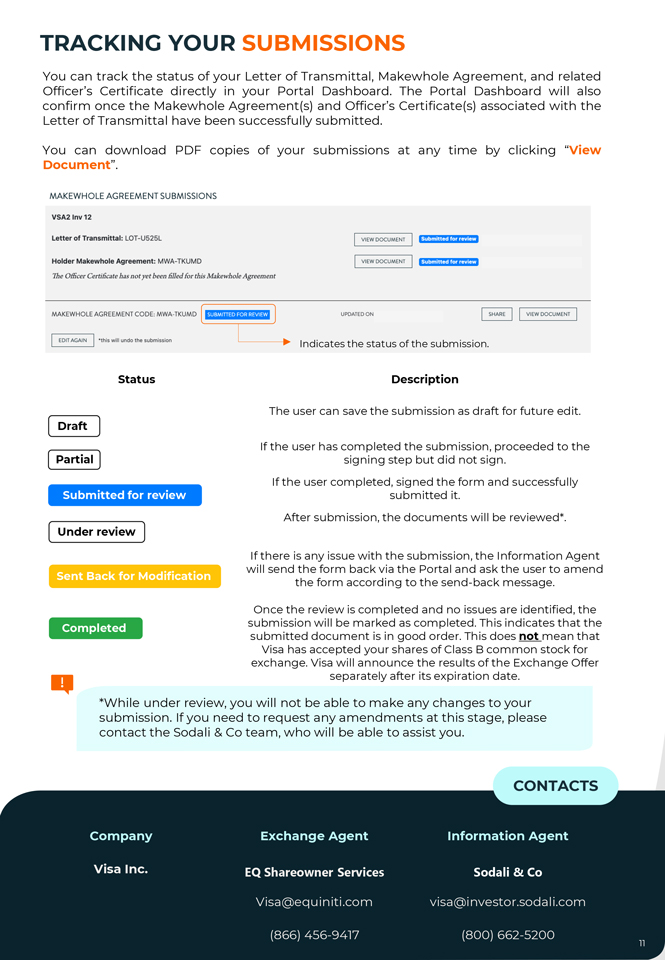
CONTACTS Company Exchange Agent Information Agent Visa Inc. EQ Shareowner Services Sodali & Co Visa@equiniti.com visa@investor.sodali.com (866) 456-9417 (800) 662-5200 9 TRANSMITTAL REVIEWING & COMPLETING THE LETTER OF STEP 2 OF 3 Once you have clicked “Continue”, you can review the complete Letter of Transmittal. Follow the steps below: • Click “Edit” if you need to make any changes. • Click “Preview Letter of Transmittal” in the blue box to review the document. • Once all steps are completed, the “Continue” button will become available. PREVIEW LETTER OF TRANSMITTAL EDIT E+ii:iiii’ii *Please click on ‘Preview Letter of Transmittal’ in order to continue. CONTACTS Company Exchange Agent Information Agent Visa Inc. EQ Shareowner Services Sodali & Co Visa@equiniti.com visa@investor.sodali.com (866) 456-9417 (800) 662-5200 9
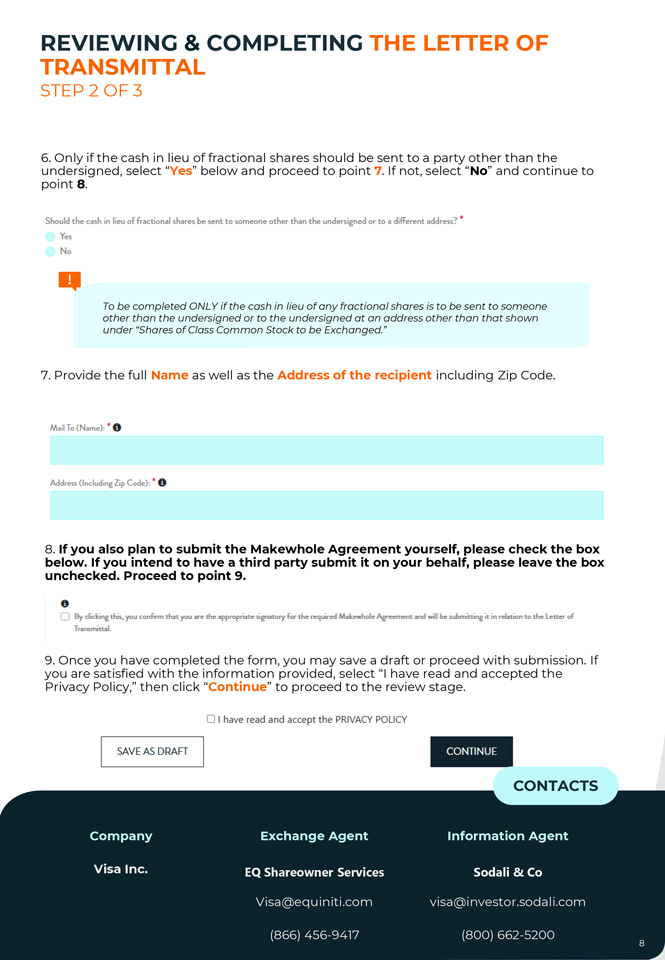
SUBMITTING THE LETTER OF TRANSMITTAL STEP 3 OF 3 Now that you have reviewed the Letter of Transmittal, you will be prompted to sign it using one of the available methods below. Method 2 (e-signature) should be used as the preferred method whenever possible. Signature Method 1: Download and review the letter oflrarn:mittal in order to sign rt and upload the Executed version of die form. Signature Method 2: Review ,and sign the letter of Transmittal electronically. Note: By.selec.t1I1g “SigNtur:e Method 2” you ,wree, acknowledge and understand tfutyour signature provided be/o~ is your electronic si{:nature, .that you 1I1tend to sign -and be legally bound by the document being signed, and that such ek-ctronic signature shall have the Silffle lega7 force .md effect as a handwritten signature for all purposes. DOWNLOAD AND REVIEW THE LETTEROFTRANSMITTAl DOCUMENT OOWNLOAD Ll 111 ROf IRANSMIIIAl Method 1: If you prefer to sign manually, download the Letter SUBMISSION OPTIONS(CHOOSE ONE) of Transmittal in order to sign it and upload the executed 0 UPLOAD THE SIGNED LETTER OF TRANSMITTAL version of the form; or II No file chosen _. SUBMISSION METHOD 2: SIGN THE LETTER OF TRANSMITTAlONUNE You can save your M£nature foc future us.e 11eross 11II your submissions 11nd pr~ects. I SAI/ESIGN,\Tl.lAE I 51.gnobovethelme SAVE SIGNATURE CLEAR Method 2: If you prefer to sign electronically, choose the “Sign the Letter of Transmittal online” option and then click “Save Signature” UPLOAD FLIES SUBSTITUTE FROM W-9 II No6le uplmdffi You can upload pdf zip png jpg tiff jpeg l[yoo need to suM11t a Substitute Form W-9, you can download it from the Portal dashboard, (i.11 the forminandattachithere. I ADO MORE FILES (Ol’flONM,) I If you need to submit a Form W-9, you can download it from the Portal dashboard, complete the form and attach it here. You may refer to page 5 of the Instructions. STEP 3, SUBMIT AND COMPLETE SUBMIT TO COMPLETE TH E PROCEDURE After the executed Letter of Transmittal is uploaded or electronically signed, submit it by clicking on “SUBMIT TO COMPLETE THE PROCEDURE” CONTACTS Company Exchange Agent Information Agent Visa Inc. EQ Shareowner Services Sodali & Co Visa@equiniti.com visa@investor.sodali.com (866) 456-9417 (800) 662-5200 10
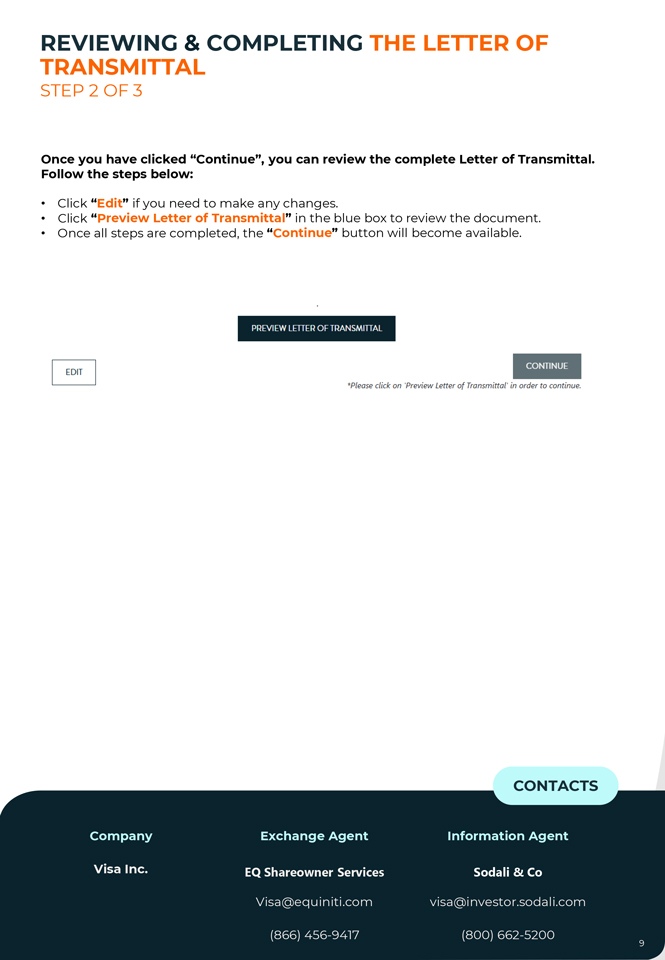
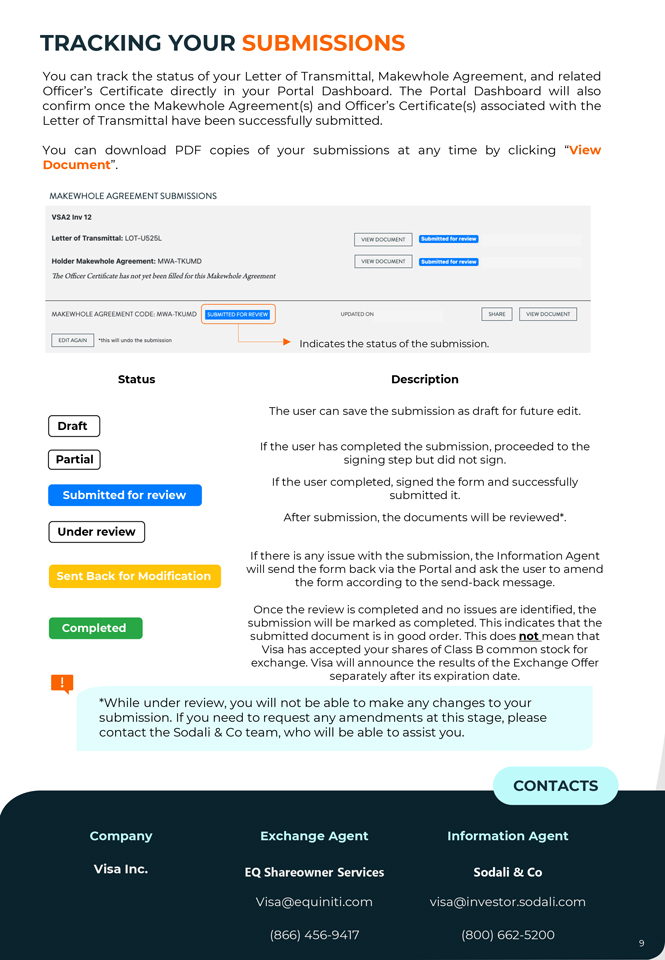
TRACKING YOUR SUBMISSIONS You can track the status of your Letter of Transmittal, Makewhole Agreement, and related Officer’s Certificate directly in your Portal Dashboard. The Portal Dashboard will also confirm once the Makewhole Agreement(s) and Officer’s Certificate(s) associated with the Letter of Transmittal have been successfully submitted. You can download PDF copies of your submissions at any time by clicking “View Document”. MAKEWHOLE AGREEMENT SUBMISSIONS VSA2 lnv12 Letter of Transmittal: LOT-U525L VIEW DOCUMENT ffj:fffi\ltilMffiittl Holder Makewhole Agreement: MWA-TKUM D VIEW DOCUMENT fitl®flit¥1¢1ffitt1 The Officer Certificate has not yet been filled for this Makewho/e Agreement MAKEWHOLE AGREEMENT CODE, MWA-TKUMD [ fi•IW11M•·llii1ial1 ] UPDATED ON ~I VIEW DOCUMENT I I EDIT AGAIN I •this will undo the submission I Indicates the status of the submission. Status Description The user can save the submission as draft for future edit. Draft If the user has completed the submission, proceeded to the Partial signing step but did not sign. If the user completed, signed the form and successfully Submitted for review submitted it. After submission, the documents will be reviewed*. Under review If there is any issue with the submission, the Information Agent will send the form back via the Portal and ask the user to amend Sent Back for Modification the form according to the send-back message. Once the review is completed and no issues are identified, the Completed submission will be marked as completed. This indicates that the submitted document is in good order. This does not mean that Visa has accepted your shares of Class B common stock for exchange. Visa will announce the results of the Exchange Offer separately after its expiration date. *While under review, you will not be able to make any changes to your submission. If you need to request any amendments at this stage, please contact the Sodali & Co team, who will be able to assist you. CONTACTS Company Exchange Agent Information Agent Visa Inc. EQ Shareowner Services Sodali & Co Visa@equiniti.com visa@investor.sodali.com (866) 456-9417 (800) 662-5200
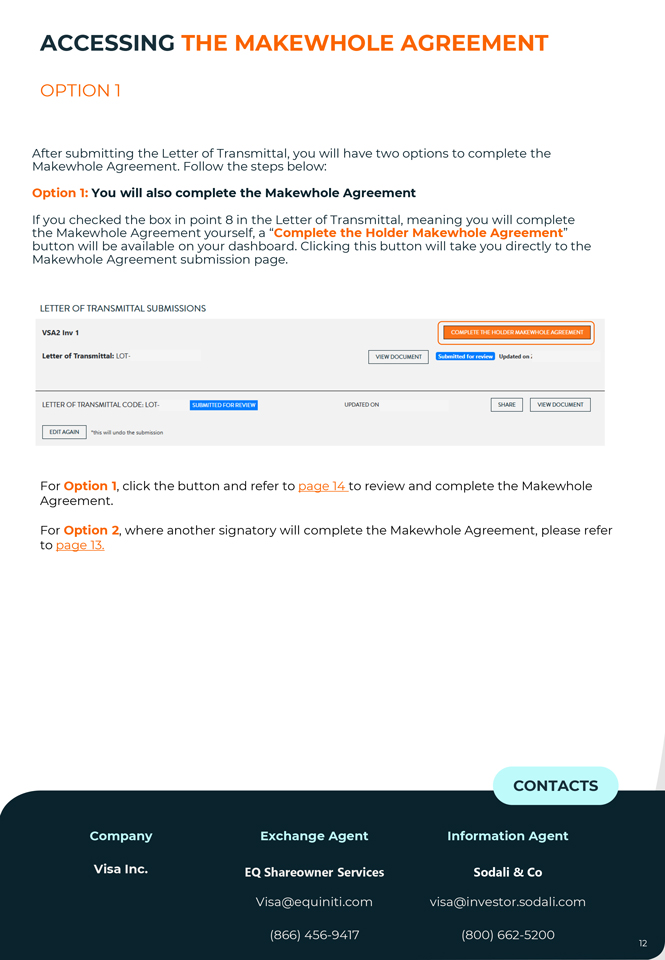
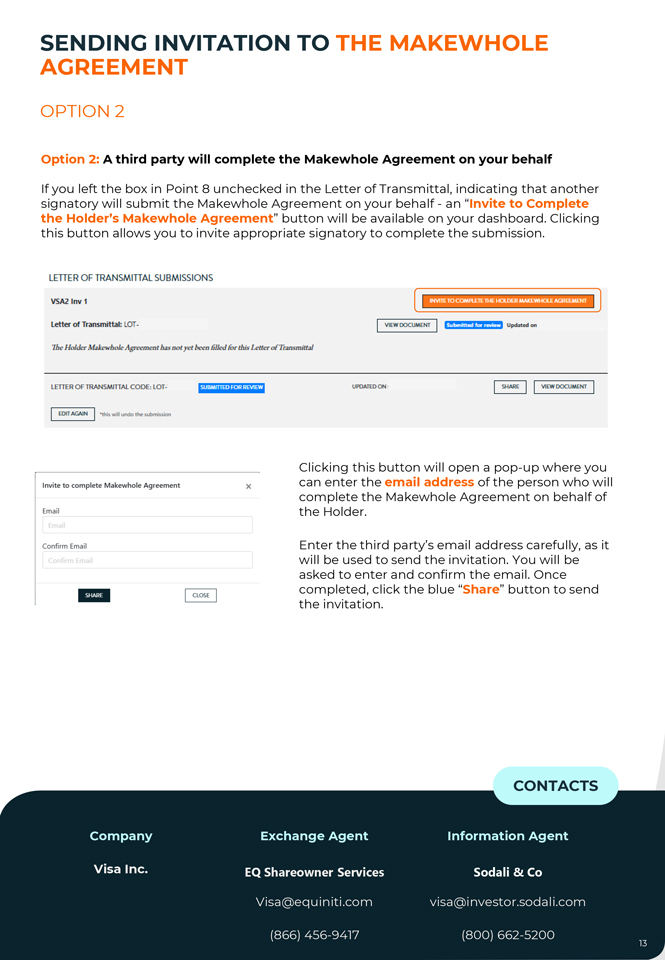
ACCESSING THE MAKEWHOLE AGREEMENT OPTION 1 Makewhole After submitting Agreement the Letter . Follow of Transmittal, the steps below: you will have two options to complete the Option 1: You will also complete the Makewhole Agreement the If you Makewhole checked the Agreement box in point yourself, 8 in the a “ Complete Letter of Transmittal, the Holder meaning Makewhole you Agreement will complete ” button Makewhole will be Agreement available on submission your dashboard page. . Clicking this button will take you directly to the LETTER OF TRANSMITTAL SUBMISSIO NS VSA2 Inv 1 Letter of Transmittal: LOT- VIEW DOCUMENT I Jiflffiffiiffilj./lj,/’ Updated o n ; LETTER OF TRANSMITTAL CODE, LOT- ii1 J:f Ml11illi·l·i·Jile11 UPDATED ON ~I VIEW DOCUMENT I I EDIT AGAIN I *this will undo the submi5sion For Option 1, click the button and refer to page 14 to review and complete the Makewhole Agreement. For Option 2, where another signatory will complete the Makewhole Agreement, please refer to page 13. CONTACTS Company Exchange Agent Information Agent Visa Inc. EQ Shareowner Services Sodali & Co Visa@equiniti.com visa@investor.sodali.com (866) 456-9417 (800) 662-5200 CONTACTS Company Exchange Agent Information Agent Visa Inc. EQ Shareowner Services Sodali & Co Visa@equiniti.com visa@investor.sodali.com (866) 456-9417 (800) 662-5200 SENDING AGREEMENT INVITATION TO THE MAKEWHOLE OPTION 2 Option 2: A third party will complete the Makewhole Agreement on your behalf If you left the box in Point 8 unchecked in the Letter of Transmittal, indicating that another signatory will submit the Makewhole Agreement on your behalf—an “Invite to Complete the Holder’s Makewhole Agreement” button will be available on your dashboard. Clicking this button allows you to invite appropriate signatory to complete the submission. LETTER OF TRANSMITTAL SUBMISSIONS VSA2 Inv 1 I l Letter of Transmittal: LOT- VIEW DOCUMENT lftitj;J;fl:· Ir j I Updoned on 1he Holder ,M.Uewholc AgTCcm cn.t h:is not y1:t been lillcd for this Lctkr ofT r. msm itml LE“TTER OF TRANSMITTA L CODEc LOT- SUBMITTED FOR REVI~ UPDATED ON I SHARE I I VlEWDOCLIMEHT a>n AGAIN •this wil undo tlv: s11’1miS,$iDn Invite to complete Makewhole Agreement X Email Confirm Email SHARE CLOSE Clicking this button will open a pop-up where you can enter the email address of the person who will complete the Makewhole Agreement on behalf of the Holder. Enter the third party’s email address carefully, as it will be used to send the invitation. You will be asked to enter and confirm the email. Once completed, click the blue “Share” button to send the invitation. CONTACTS Company Exchange Agent Information Agent Visa Inc. EQ Shareowner Services Sodali & Co Visa@equiniti.com visa@investor.sodali.com (866) 456-9417 (800) 662-5200
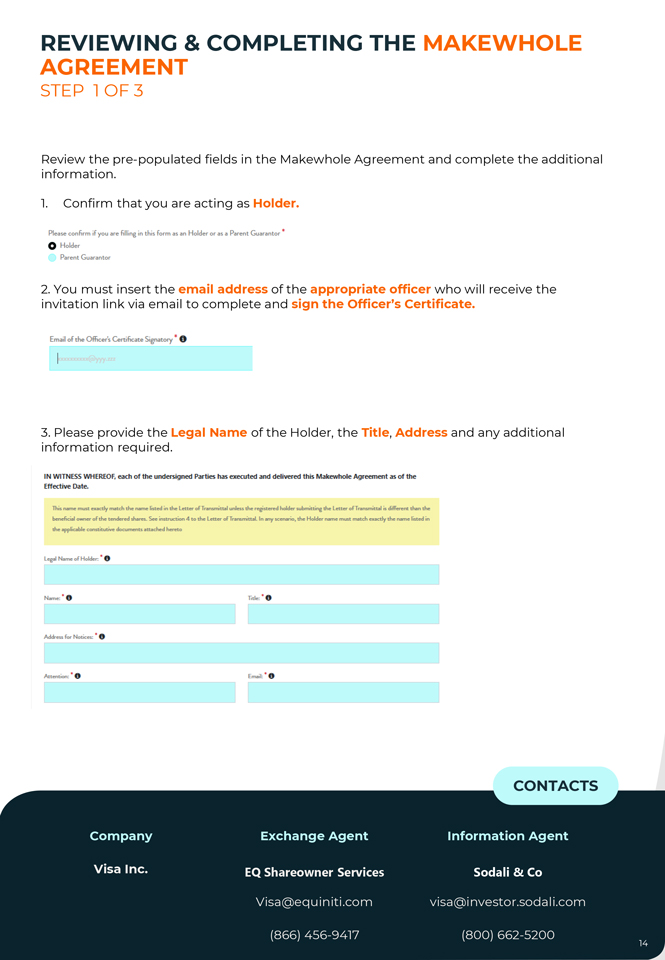
REVIEWING AGREEMENT & COMPLETING THE MAKEWHOLE STEP 1 OF 3 Review the pre-populated fields in the Makewhole Agreement and complete the additional information. 1. Confirm that you are acting as Holder. Please confirm if you are tilling in this form as an Holder or as a Parent Guarantor * 0 Holder Parent Guarantor 2. You must insert the email address of the appropriate officer who will receive the invitation link via email to complete and sign the Officer’s Certificate. Email of die Off.cer’s Certificate Signatory * 0 3. Please provide the Legal Name of the Holder, the Title, Address and any additional information required. IN WITNESS WHEREOF, each of the undersigned Parties has executed and delivered this Makewhole Agreement as of the Effective Date. This. name mint euctfy m.,tch t~name listed in the letter oflninsmittal unless the registered holder submittine the Letter ofTransmitt .-.1 is different than the beneficial owner of the- t.endered sh.v=. ~instructian 4 to the Letter ofTf“llllll5mitbL In rriy scen111ria, the Holder name must m.,tch exactly die name listed in the Dppliablc- cons.t~documents att.-.chc-d hereto Legal Name of Holder. • 0 Name:: Trtle:: • 0 Acldns.sfu-Notices:: • 0 Attention: • 0—· o CONTACTS Company Exchange Agent Information Agent Visa Inc. EQ Shareowner Services Sodali & Co Visa@equiniti.com visa@investor.sodali.com (866) 456-9417 (800) 662-5200
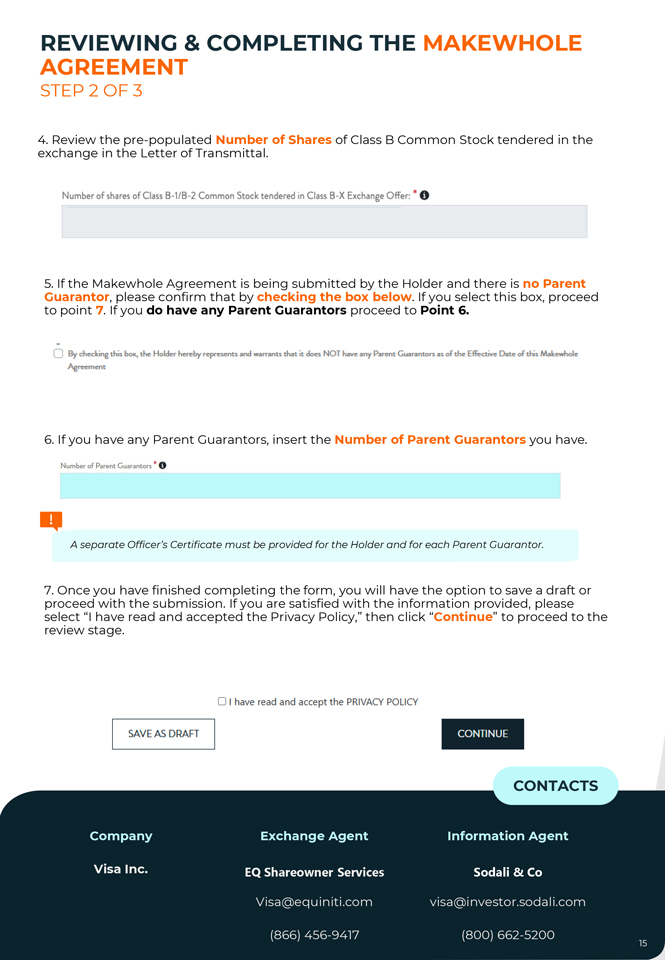
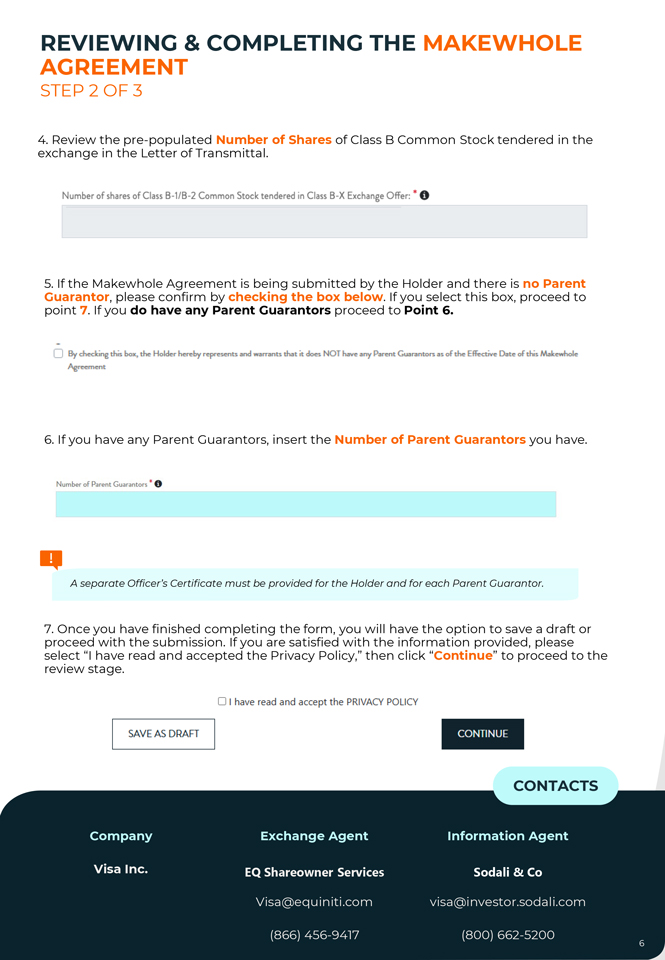
REVIEWING AGREEMENT & COMPLETING THE MAKEWHOLE STEP 2 OF 3 4 exchange . Review the in the pre Letter -populated of Transmittal Number. of Shares of Class B Common Stock tendered in the Number of shares of Class B-1/B-2 Common Stock tendered in Class B-X Exchange Offer: * 0 Guarantor 5. If the Makewhole , please confirm Agreement that by is being checking submitted the box by below the Holder . If you and select there this is box, no Parent proceed to point 7. If you do have any Parent Guarantors proceed to Point 6. 0 ~· By ched:ins this Eimo, the Holder h..diy ~n,s.e111ts and .....,..nts !hot it does NOT Ii- any Pattnt Guarant1m as of~E~Dote of !his Mal...d,,,le 6. If you have any Parent Guarantors, insert the Number of Parent Guarantors you have. Number of Parent Guarantors * 0 A separate Officer’s Certificate must be provided for the Holder and for each Parent Guarantor. proceed 7. Once you with have the finished submission completing . If you are the satisfied form, you with will the have information the option provided, to save please a draft or review select “I stage have. read and accepted the Privacy Policy,” then click “Continue” to proceed to the 0 I have read and accept t he PRIVACY POLICY SAVE AS DRAFT CONTINUE CONTACTS Company Exchange Agent Information Agent Visa Inc. EQ Shareowner Services Sodali & Co Visa@equiniti.com visa@investor.sodali.com (866) 456-9417 (800) 662-5200
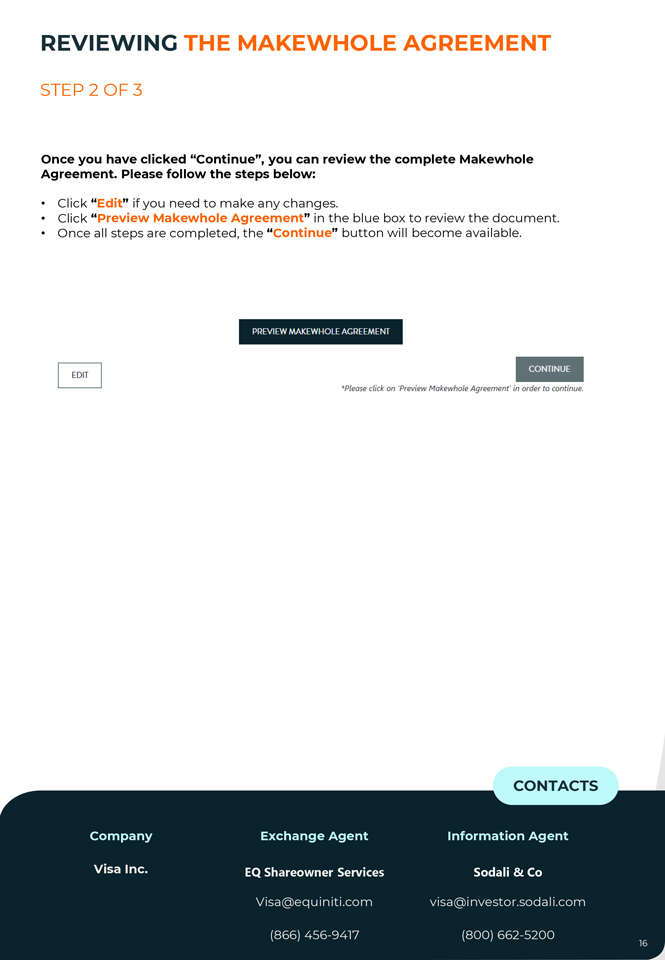
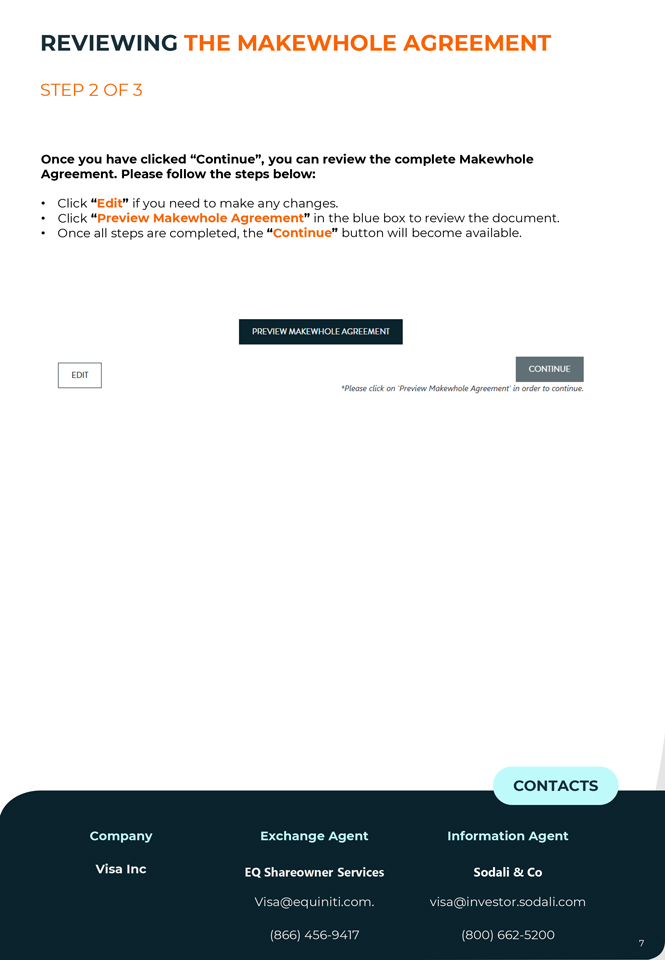
REVIEWING THE MAKEWHOLE AGREEMENT STEP 2 OF 3 Once you have clicked “Continue”, you can review the complete Makewhole Agreement. Please follow the steps below: • Click “Edit” if you need to make any changes. • Click “Preview Makewhole Agreement” in the blue box to review the document. • Once all steps are completed, the “Continue” button will become available. PREVIEW MAKEWHOLE AGREEMENT EDIT i·ii:iii\iii *Please click on ‘Preview Makewhole Agreement’ in order to continue, CONTACTS Company Exchange Agent Information Agent Visa Inc. EQ Shareowner Services Sodali & Co Visa@equiniti.com visa@investor.sodali.com (866) 456-9417 (800) 662-5200
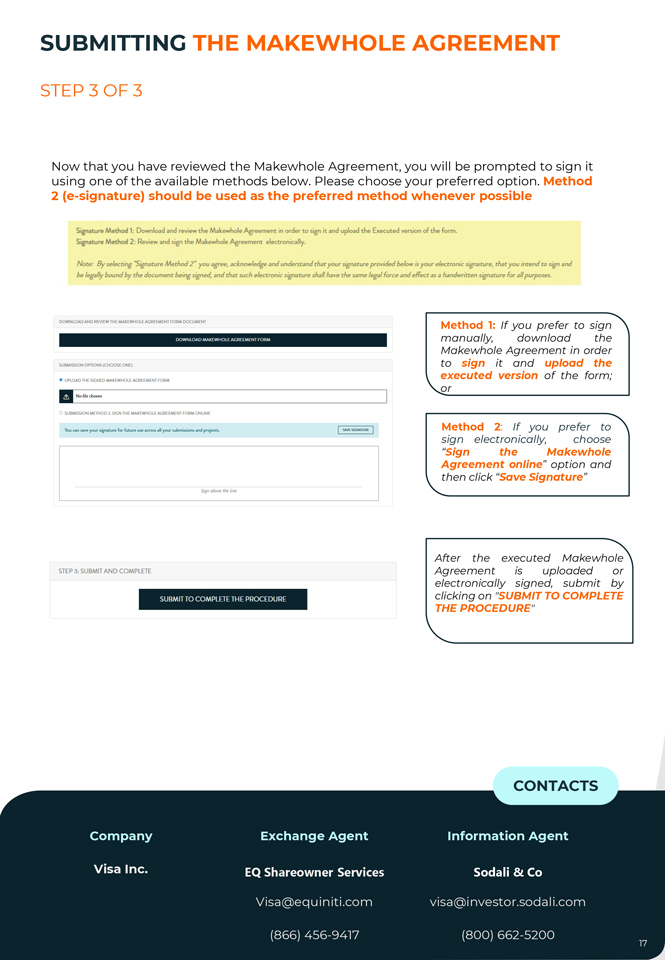
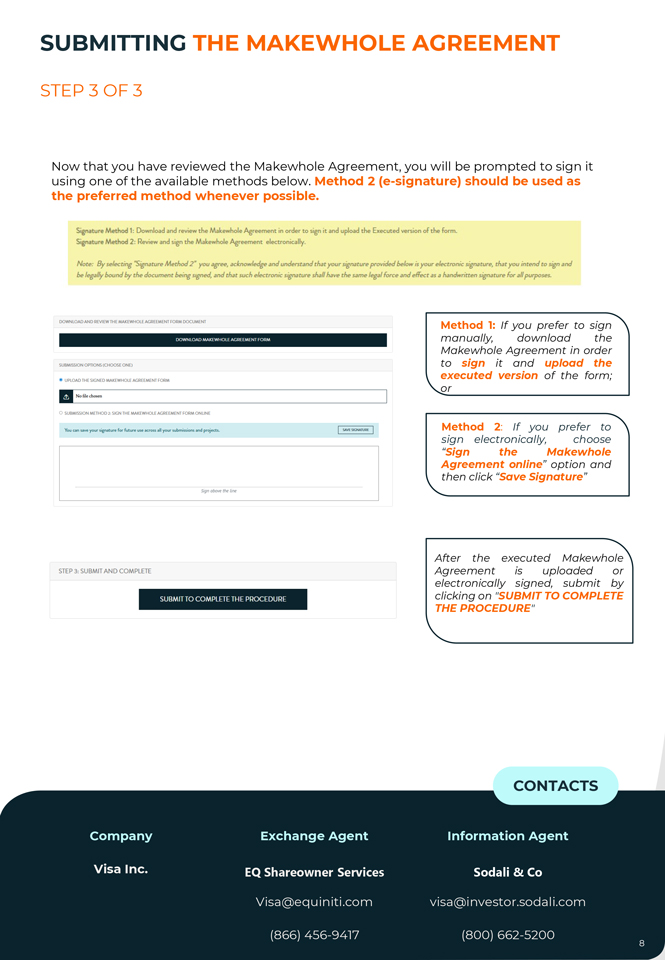
SUBMITTING THE MAKEWHOLE AGREEMENT STEP 3 OF 3 Now that you have reviewed the Makewhole Agreement, you will be prompted to sign it using one of the available methods below. Please choose your preferred option. Method 2 (e-signature) should be used as the preferred method whenever possible Signature Method 1: Download and r-eview the Makewhole Agreement in or-det- to sign it and upload the Executed version of the fom:t. Signatur-e Method 2: Review and sign the Mal:.ewf’lole Agf’eement electronically. Note: By .selecting -Signature Method 2• you “agree, acknowledge and understand that your signature prowded “below ;s your electronic si.gnatare, that you inte(ld to sign and be legally bound by the document being sicned. and that such electronic signature shall have tbe same legal force and effect ;rs a handwritten signature for ,:1/1 purposes.. Method 1: If you prefer to sign OOWNLOAD MA.(fWHOL F AGAH MFNT FOAM manually, download the Makewhole Agreement in order DOWNLOADE AND REVIEW THE MAKEWHOLE AGREEMENT FROM DOCUMENT SUBMISSION OPTIONS {CHOOSE ONE) to sign it and upload the executed version of the form; • UPLOAD THE SIGNED MAKEWHOLE AGAEEMENT l’ORM or II N061 .. chOSN1 0 SUBMISSION METH002, SIGN THEMA.ll(EWHOLE AGAEEMENT FOOMONUNE You can -y<><J< “Bnature for future uoe ac ron all your ,ubmin,on, and pr~Kh. Method 2: If you prefer to sign electronically, choose “Sign the Makewhole Agreement online” option and then click “Save Signature” Signa~theline After the executed Makewhole STEP 3, SUBMIT AND COMPLETE Agreement is uploaded or electronically signed, submit by SUBMIT TO COMPLETE THE PROCEDURE clicking on “SUBMIT TO COMPLETE THE PROCEDURE” CONTACTS Company Exchange Agent Information Agent Company Exchange Agent Information Agent Visa Inc. EQ Shareowner Services Sodali & Co Visa Inc Equiniti Trust Company, LLC Sodali & Co Visa@equiniti.com visa@investor.sodali.com Visa@equiniti.com. visa@investor.sodali.com (866) 456-9417 (800) 662-5200
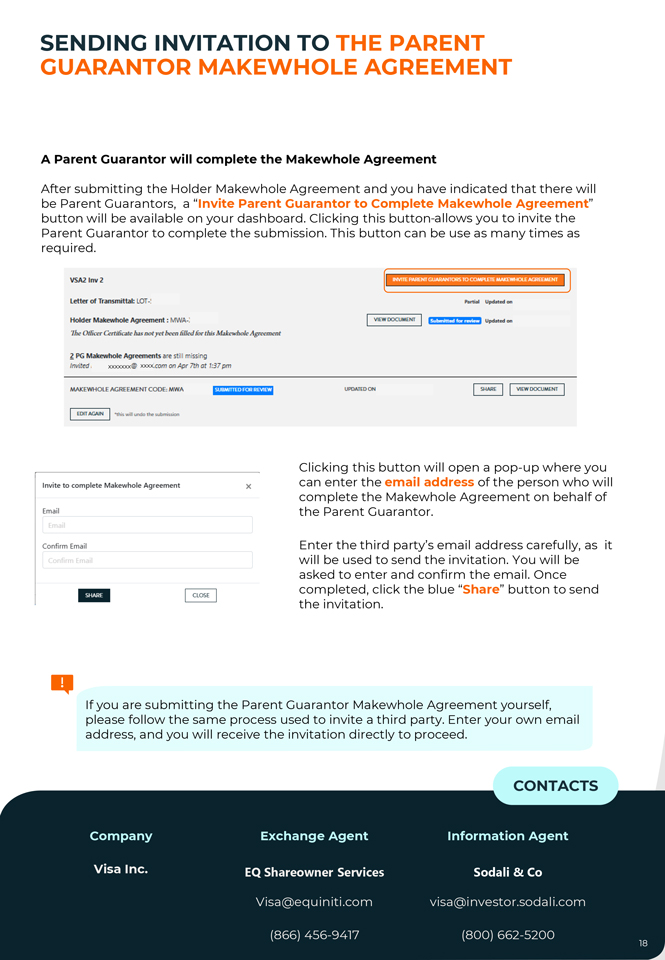
SENDING GUARANTOR INVITATION MAKEWHOLE TO THE AGREEMENT PARENT A Parent Guarantor will complete the Makewhole Agreement After submitting the Holder Makewhole Agreement and you have indicated that there will be Parent Guarantors, a “Invite Parent Guarantor to Complete Makewhole Agreement” button will be available on your dashboard. Clicking this button allows you to invite the Parent Guarantor to complete the submission. This button can be use as many times as required. VSA2 Inv 2 Lette, of Transmittal: LOT i P.artfal Upc:1.>trd on Holder Makewhole Agreement : MWA-: I Vl~OOCUMENT @tfu!Hl:•I: j p UpdatMl on Thi! O/liccr UctiliGJt.c h:is notyet been lil/cd far this Malcl:‘wbalc Agreement Z. PG Makewhole Agreements are still missing Invited , xxxxxxx@ xxxx,com on Apr 7th at 1:37 pm MAKEWHOLE AGREEMENT CODE, MWA f~ij:I UujtJ·• t/511! j UPOATEDON ~VIEW DOCUMENJ EDIT .A.GAIN “this; will u rKlc tAe submillion Clicking this button will open a pop-up where you Invite to complete Makewhole Agreement can enter the email address of the person who will X complete the Makewhole Agreement on behalf of Email the Parent Guarantor. Confirm Email SHARE CLOSE Enter the third party’s email address carefully, as it will be used to send the invitation. You will be asked to enter and confirm the email. Once completed, click the blue “Share” button to send the invitation. If you are submitting the Parent Guarantor Makewhole Agreement yourself, please follow the same process used to invite a third party. Enter your own email address, and you will receive the invitation directly to proceed. CONTACTS Company Exchange Agent Information Agent Visa Inc. EQ Shareowner Services Sodali & Co Visa@equiniti.com visa@investor.sodali.com (866) 456-9417 (800) 662-5200
Email: visa@investor.sodali.com Contact Center: (800) 662-5200 NEW YORK STAMFORD TORONTO DUBLIN FRANKFURT LONDON MADRID PARIS ROME HONG KONG MANILA MELBOURNE PERTH SEOUL SYDNEYTOKYO BUENOS AIRES SAO PAULO
PARTICIPATION INSTRUCTIONS VISA INC. CLASS B STOCK EXCHANGE OFFER B) MAKEWHOLE AGREEMENT—HOLDER VISA
INDEX IMPORTANT INFORMATION 3 ACCESSING THE MAKEWHOLE AGREEMENT 4 REVIEWING & COMPLETING THE MAKEWHOLE AGREEMENT 5 SUBMITTING THE MAKEWHOLE AGREEMENT 7 TRACKING YOUR SUBMISSIONS 8
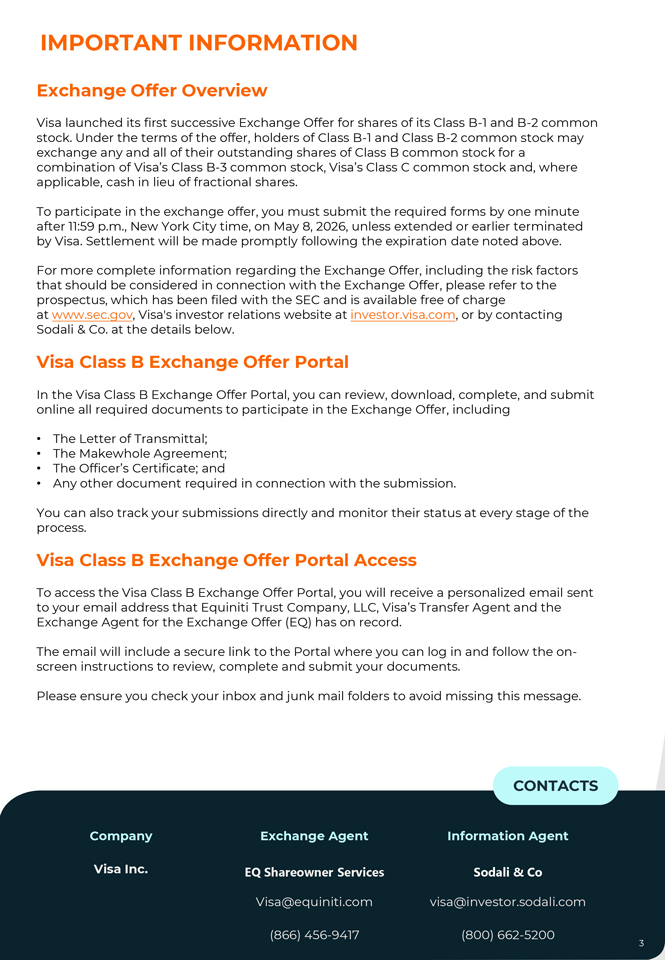
IMPORTANT INFORMATION Exchange Offer Overview Visa launched its first successive Exchange Offer for shares of its Class B-1 and B-2 common stock. Under the terms of the offer, holders of Class B-1 and Class B-2 common stock may exchange any and all of their outstanding shares of Class B common stock for a combination of Visa’s Class B-3 common stock, Visa’s Class C common stock and, where applicable, cash in lieu of fractional shares. To participate in the exchange offer, you must submit the required forms by one minute after 11:59 p.m., New York City time, on May 8, 2026, unless extended or earlier terminated by Visa. Settlement will be made promptly following the expiration date noted above. For more complete information regarding the Exchange Offer, including the risk factors that should be considered in connection with the Exchange Offer, please refer to the prospectus, which has been filed with the SEC and is available free of charge at www.sec.gov, Visa’s investor relations website at investor.visa.com, or by contacting Sodali & Co. at the details below. Visa Class B Exchange Offer Portal In the Visa Class B Exchange Offer Portal, you can review, download, complete, and submit online all required documents to participate in the Exchange Offer, including • The Letter of Transmittal; • The Makewhole Agreement; • The Officer’s Certificate; and • Any other document required in connection with the submission. You can also track your submissions directly and monitor their status at every stage of the process. Visa Class B Exchange Offer Portal Access To access the Visa Class B Exchange Offer Portal, you will receive a personalized email sent to your email address that Equiniti Trust Company, LLC, Visa’s Transfer Agent and the Exchange Agent for the Exchange Offer (EQ) has on record. The email will include a secure link to the Portal where you can log in and follow the on-screen instructions to review, complete and submit your documents. Please ensure you check your inbox and junk mail folders to avoid missing this message. CONTACTS Company Exchange Agent Information Agent Visa Inc. EQ Shareowner Services Sodali & Co Visa@equiniti.com visa@investor.sodali.com (866) 456-9417 (800) 662-5200
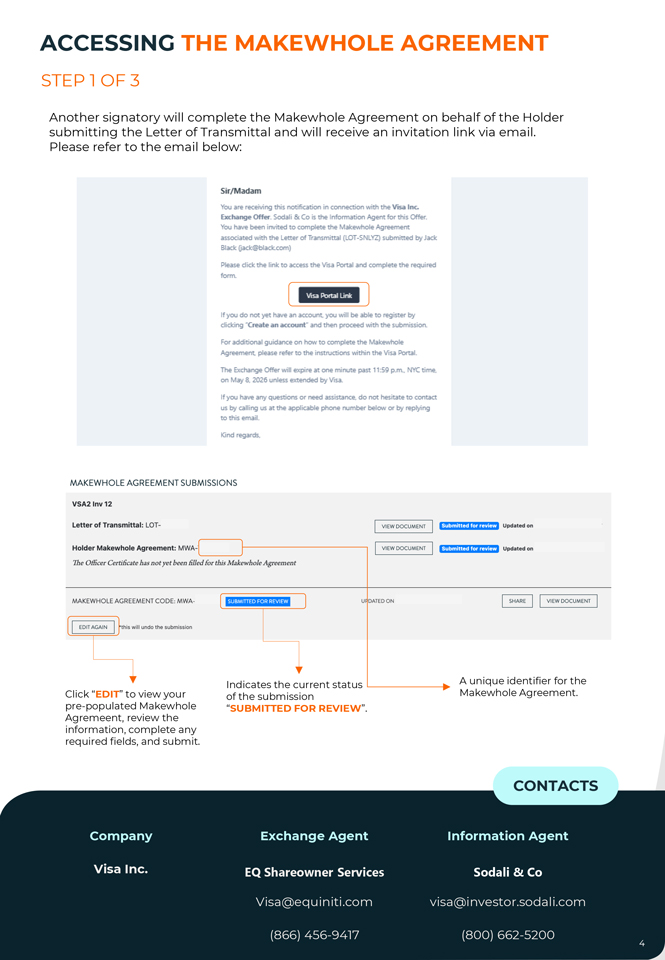
ACCESSING THE MAKEWHOLE AGREEMENT STEP 1 OF 3 Another signatory will complete the Makewhole Agreement on behalf of the Holder submitting the Letter of Transmittal and will receive an invitation link via email. Please refer to the email below: Sir/Madam You are receiving this notification in connection with the Vasa Inc. Exchange Offer-. Scx:lali & Co is the Information Agent fo.- this Oifa_ You have been irwited to oom,plete the Mak.ewhole Agreement associated with the Letter of Transmittal (LOT-SNLVZ) submitted by Jack Black (ia,ck.@bladc.com) Please dick the link to access the Vtsa Portal and compl~te the required form. [ Ffa§HI l If yoo do not yet hav.e an account. yoo will be able to register by dicking · c reate an account· and then proceed wtth the submission. For adcitiona guidance on how to complete the Make-nhole Agreement. please refer to the instructions Wthin the Visa Portal. The Exchange otter will expire at one mi..rte past 11:59 p.m., NYC time. on May 8. 2025 unless extended by Visa. If you have anyquestiom or need assista~ do not hesitate to contact us by calling Lfi at the applicable phone number below or by replying to this email. Kind regards. MA KEWH O LE AGREEMENT SUBMISSIO NS VSA2 lnv12 Letter of Transmittal: LOT- VIEW DOCUMENT (ibffiiti11M!ffitti Updated on Holder Makewhole Agreement: MWA-· VIEW DOCUMENT f-Mttfli0f¥1Mlfti@ Updated on The O.iicer Certificate has not yet been filled for this Makewhole Agreement MAKEWHOLE AGREEMENT CODE, MWA- ii1MtJi¦1i·i#·lliMIMi U DATEDON ~I VIEW DOCUMENT I I EDIT AGAIN I this will undo the submission Indicates the current status A unique identifier for the Click “EDIT” to view your of the submission Makewhole Agreement. pre-populated Makewhole “SUBMITTED FOR REVIEW”. Agremeent, review the information, complete any required fields, and submit. CONTACTS Company Exchange Agent Information Agent Visa Inc. EQ Shareowner Services Sodali & Co Visa@equiniti.com visa@investor.sodali.com (866) 456-9417 (800) 662-5200
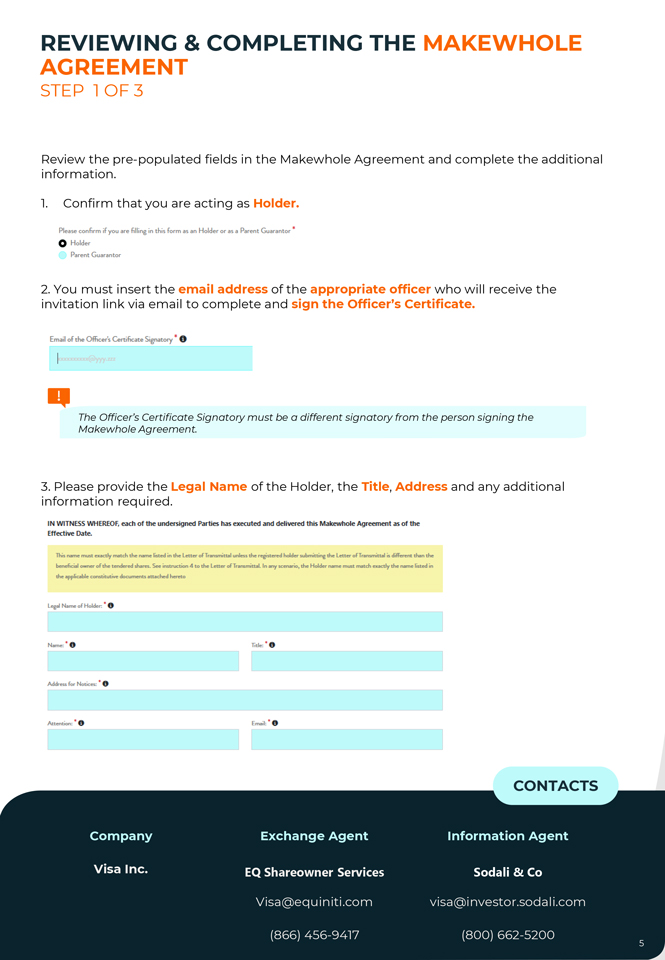
REVIEWING AGREEMENT & COMPLETING THE MAKEWHOLE STEP 1 OF 3 Review the pre-populated fields in the Makewhole Agreement and complete the additional information. 1. Confirm that you are acting as Holder. Please confirm if you are filling in this form as an Holder or as a Parent Guarantor * 0 Hold« Parent Guarantor 2. You must insert the email address of the appropriate officer who will receive the invitation link via email to complete and sign the Officer’s Certificate. Email of die Off.cer’s Certificate Signatory * 0 The Officer’s Certificate Signatory must be a different signatory from the person signing the Makewhole Agreement. 3. Please provide the Legal Name of the Holder, the Title, Address and any additional information required. IN WITNESS WHEREOF, each of the undersigned Parties has executed and delivered this Makewhole Agreement as of the Effective Date. This.name mmt ~matchtM-name listed in ~letter ofTn1nsmitt111I unlenlhe r~~erHho&der S1.1bnvtbn,g the LetterofTninHTiitt.al is d~11.... the beneficial owner-of the- tender-eel shares. Sec instructian 4 to tlW! Lett:cr-ofTransmrtbL In riy scenario, the Holder name mmtmatch cx11ctlythe-namc lirtcd iin the ;spplic.11blc cons.titutft’c documents tittac:hcd h~o Legal Name of Holder. • G N.wnc: • 0 Titlc: • 0 Adckes.s fof’ Notxcs: • 0 Attention: Email: CONTACTS Company Exchange Agent Information Agent Visa Inc. EQ Shareowner Services Sodali & Co Visa@equiniti.com visa@investor.sodali.com (866) 456-9417 (800) 662-5200
REVIEWING AGREEMENT & COMPLETING THE MAKEWHOLE STEP 2 OF 3 4 exchange . Review the in the pre Letter -populated of Transmittal Number. of Shares of Class B Common Stock tendered in the Number of shares of Class B-1/B-2 Common Stock tendered in Class B-X Exchange Offer: * 0 5 Guarantor . If the Makewhole , please confirm Agreement by checking is being the submitted box below by the . If you Holder select and this there box, is proceed no Parent to point 7. If you do have any Parent Guarantors proceed to Point 6. 0 ~· By ched:ins this Eimo, the Holder h..diy ~n,s.e111ts and .....,..nts !hot it does NOT Ii- any Pattnt Guarant1m as of~E~Dote of !his Mal...d,,,le 6. If you have any Parent Guarantors, insert the Number of Parent Guarantors you have. Number of Parent Guarantors * 0 A separate Officer’s Certificate must be provided for the Holder and for each Parent Guarantor. 7 proceed . Once you with have the finished submission completing . If you are the satisfied form, you with will the have information the option provided, to save please a draft or select review “I stage have. read and accepted the Privacy Policy,” then click “Continue” to proceed to the 0 I have read and accept t he PRIVACY POLICY SAVE AS DRAFT CONTINUE CONTACTS Company Exchange Agent Information Agent Visa Inc. EQ Shareowner Services Sodali & Co Visa@equiniti.com visa@investor.sodali.com (866) 456-9417 (800) 662-5200
REVIEWING THE MAKEWHOLE AGREEMENT STEP 2 OF 3 Once you have clicked “Continue”, you can review the complete Makewhole Agreement. Please follow the steps below: • Click “Edit” if you need to make any changes. • Click “Preview Makewhole Agreement” in the blue box to review the document. • Once all steps are completed, the “Continue” button will become available. PREVIEW MAKEWHOLE AGREEMENT EDIT i·ii:iii\iii *Please click on ‘Preview Makewhole Agreement’ in order to continue, CONTACTS Company Exchange Agent Information Agent Visa Inc EQ Shareowner Services Sodali & Co Visa@equiniti.com. visa@investor.sodali.com (866) 456-9417 (800) 662-5200
TRACKING YOUR SUBMISSIONS You can track the status of your Letter of Transmittal, Makewhole Agreement, and related Officer’s Certificate directly in your Portal Dashboard. The Portal Dashboard will also confirm once the Makewhole Agreement(s) and Officer’s Certificate(s) associated with the Letter of Transmittal have been successfully submitted. You can download PDF copies of your submissions at any time by clicking “View Document”. MAKEWHOLE AGREEMENT SUBMISSIONS VSA2 lnv12 Letter of Transmittal: LOT-U525L VIEW DOCUMENT ffj:fffi\ltilMffiittl Holder Makewhole Agreement: MWA-TKUM D VIEW DOCUMENT fitl®flit¥1¢1ffitt1 The Officer Certificate has not yet been filled for this Makewho/e Agreement MAKEWHOLE AGREEMENT CODE, MWA-TKUMD [ fi•IW11M•·llii1ial1 ] UPDATED ON ~I VIEW DOCUMENT I I EDIT AGAIN I •this will undo the submission I Indicates the status of the submission. Status Description The user can save the submission as draft for future edit. Draft If the user has completed the submission, proceeded to the Partial signing step but did not sign. If the user completed, signed the form and successfully Submitted for review submitted it. After submission, the documents will be reviewed*. Under review If there is any issue with the submission, the Information Agent will send the form back via the Portal and ask the user to amend Sent Back for Modification the form according to the send-back message. Once the review is completed and no issues are identified, the Completed submission will be marked as completed. This indicates that the submitted document is in good order. This does not mean that Visa has accepted your shares of Class B common stock for exchange. Visa will announce the results of the Exchange Offer separately after its expiration date. *While under review, you will not be able to make any changes to your submission. If you need to request any amendments at this stage, please contact the Sodali & Co team, who will be able to assist you. CONTACTS Company Exchange Agent Information Agent Visa Inc. EQ Shareowner Services Sodali & Co Visa@equiniti.com visa@investor.sodali.com (866) 456-9417 (800) 662-5200
Email: visa@investor.sodali.com Contact Center: (800) 662-5200 DUBLIN FRANKFURT LONDON MADRID PARIS ROME NEW YORK STAMFORD TORONTO HONG KONG MANLIA MELBOURNE SEOUL SYDNEY TOKYO BUENOS AIRES SAO PAULO
PARTICIPATION INSTRUCTIONS VISA INC. CLASS B STOCK EXCHANGE OFFER C) MAKEWHOLE AGREEMENT – PARENT GUARANTOR VISA 1
INDEX IMPORTANT INFORMATION 3 ACCESSING THE MAKEWHOLE AGREEMENT 4 REVIEWING & COMPLETING THE MAKEWHOLE AGREEMENT 5 SUBMITTING THE MAKEWHOLE AGREEMENT 7 TRACKING YOUR SUBMISSIONS 8
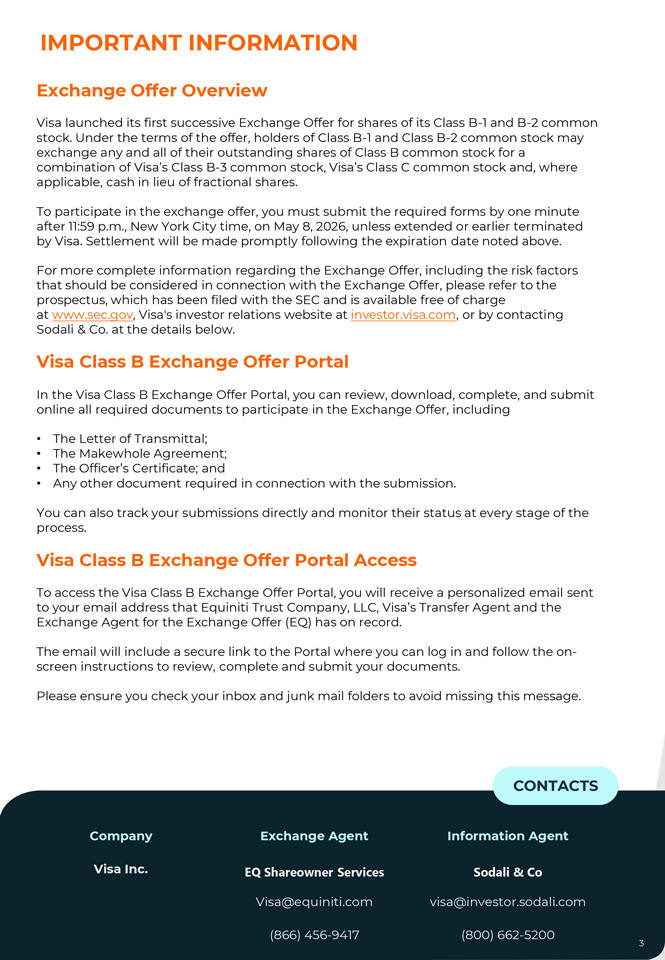
IMPORTANT INFORMATION Exchange Offer Overview Visa launched its first successive Exchange Offer for shares of its Class B-1 and B-2 common stock. Under the terms of the offer, holders of Class B-1 and Class B-2 common stock may exchange any and all of their outstanding shares of Class B common stock for a combination of Visa’s Class B-3 common stock, Visa’s Class C common stock and, where applicable, cash in lieu of fractional shares. To participate in the exchange offer, you must submit the required forms by one minute after 11:59 p.m., New York City time, on May 8, 2026, unless extended or earlier terminated by Visa. Settlement will be made promptly following the expiration date noted above. For more complete information regarding the Exchange Offer, including the risk factors that should be considered in connection with the Exchange Offer, please refer to the prospectus, which has been filed with the SEC and is available free of charge at www.sec.gov, Visa’s investor relations website at investor.visa.com, or by contacting Sodali & Co. at the details below. Visa Class B Exchange Offer Portal In the Visa Class B Exchange Offer Portal, you can review, download, complete, and submit online all required documents to participate in the Exchange Offer, including • The Letter of Transmittal; • The Makewhole Agreement; • The Officer’s Certificate; and • Any other document required in connection with the submission. You can also track your submissions directly and monitor their status at every stage of the process. Visa Class B Exchange Offer Portal Access To access the Visa Class B Exchange Offer Portal, you will receive a personalized email sent to your email address that Equiniti Trust Company, LLC, Visa’s Transfer Agent and the Exchange Agent for the Exchange Offer (EQ) has on record. The email will include a secure link to the Portal where you can log in and follow the on-screen instructions to review, complete and submit your documents. Please ensure you check your inbox and junk mail folders to avoid missing this message. CONTACTS Company Exchange Agent Information Agent Visa Inc. EQ Shareowner Services Sodali & Co Visa@equiniti.com visa@investor.sodali.com (866) 456-9417 (800) 662-5200
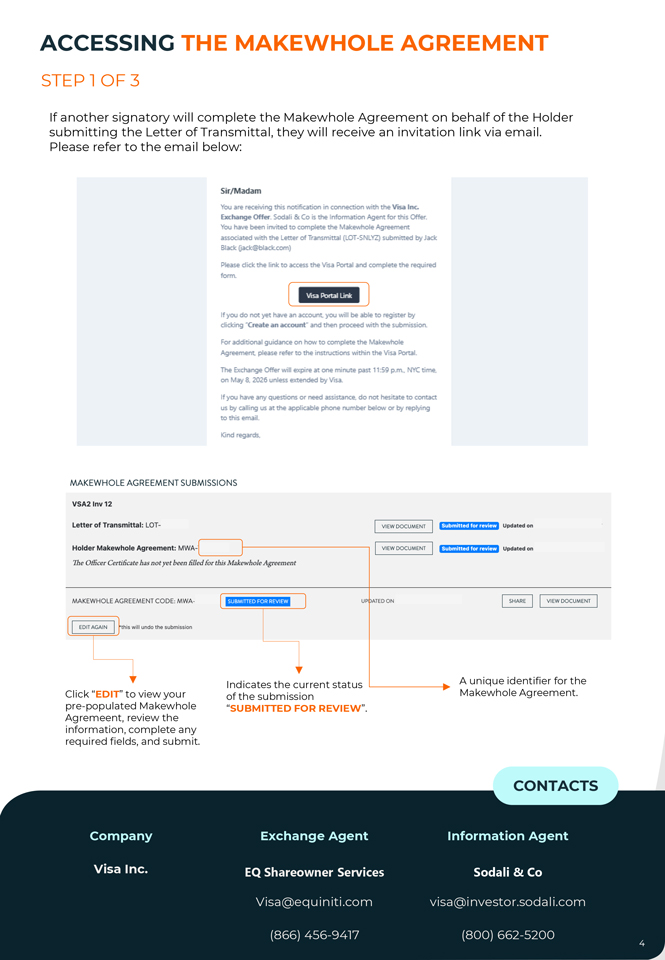
ACCESSING THE MAKEWHOLE AGREEMENT STEP 1 OF 3 If another signatory will complete the Makewhole Agreement on behalf of the Holder submitting the Letter of Transmittal, they will receive an invitation link via email. Please refer to the email below: Sir/Madam You are receiving this notification in connection with the Vasa Inc. Exchange Offer-. Scx:lali & Co is the Information Agent fo.- this Oifa_ You have been irwited to oom,plete the Mak.ewhole Agreement associated with the Letter of Transmittal (LOT-SNLVZ) submitted by Jack Black (ia,ck.@bladc.com) Please dick the link to access the Vtsa Portal and compl~te the required form. [ Ffa§HI l If yoo do not yet have an account. yoo will be able to register by dicking · c reate an account· and then proceed wtth the submission. For adcitiona guidance on how to complete the Make-nhole Agreement. please refer to the instructions Wthin the Visa Portal. The Exchange otter will expire at one mi rte past 11:59 p.m., NYC time. on May 8. 2025 unless extended by Visa. If you have anyquestiom or need assista~ do not hesitate to contact us by calling Lfi at the applicable phone number below or by replying to this email. Kind regards. MA KEWH O LE AGREEMENT SUBMISSIO NS VSA2 lnv12 Letter of Transmittal: LOT- VIEW DOCUMENT (ibffiiti11M!ffitti Updated on Holder Makewhole Agreement: MWA-· VIEW DOCUMENT f-Mttfli0f¥1Mlfti@ Updated on The O.iicer Certificate has not yet been filled for this Makewhole Agreement MAKEWHOLE AGREEMENT CODE, MWA- ii1MtJi¦1i·i#·lliMIMi UP ATEOON ~I VIEW DOCUMENT I I EDIT AGAIN I this will undo the submission Indicates the current status A unique identifier for the Click “EDIT” to view your of the submission Makewhole Agreement. pre-populated Makewhole “SUBMITTED FOR REVIEW”. Agremeent, review the information, complete any required fields, and submit. CONTACTS Company Exchange Agent Information Agent Visa Inc. EQ Shareowner Services Sodali & Co Visa@equiniti.com visa@investor.sodali.com (866) 456-9417 (800) 662-5200
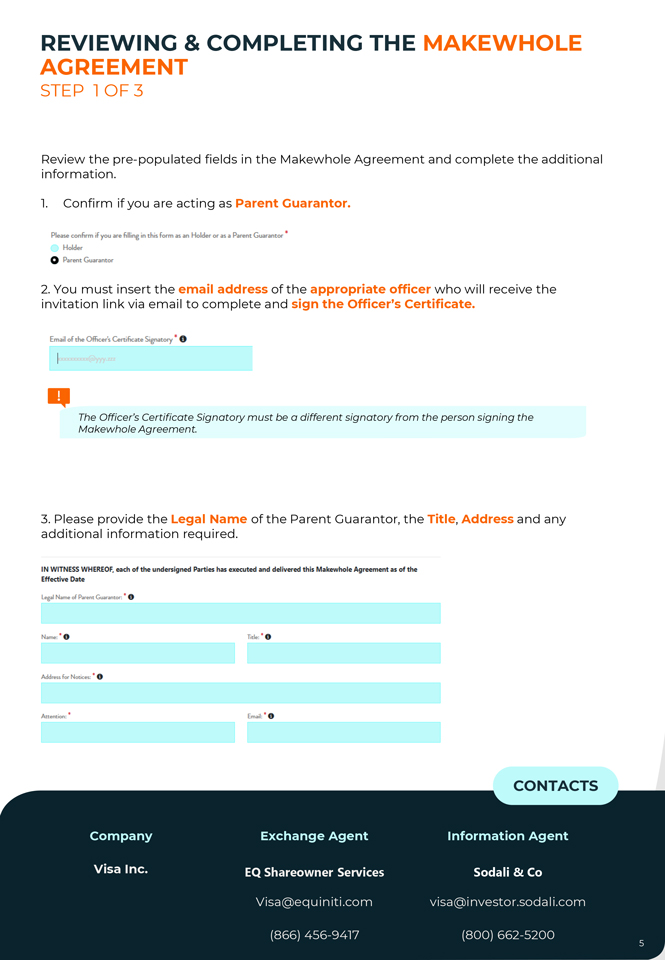
REVIEWING AGREEMENT & COMPLETING THE MAKEWHOLE STEP 1 OF 3 Review the pre-populated fields in the Makewhole Agreement and complete the additional information. 1. Confirm if you are acting as Parent Guarantor. Please confirm if you are filling in this fonn as an Holder Of” as a Parent Guarantor- • Holder 0 Pan!flt Guarantor 2. You must insert the email address of the appropriate officer who will receive the invitation link via email to complete and sign the Officer’s Certificate. Email of die Off.cer’s Certificate Signatory • 0 The Officer’s Certificate Signatory must be a different signatory from the person signing the Makewhole Agreement. 3. Please provide the Legal Name of the Parent Guarantor, the Title, Address and any additional information required. IN W ITNESS WHEREOF, each of the undersigned Parties has executed and delivered this Makewhole Agreement as of the Effective Date Legal Name of Parent Guarantor. • 0 Name: • 0 lltle: • 0 Address for Notices: • 0 Attention: • Email: • 0 CONTACTS Company Exchange Agent Information Agent Visa Inc. EQ Shareowner Services Sodali & Co Visa@equiniti.com visa@investor.sodali.com (866) 456-9417 (800) 662-5200
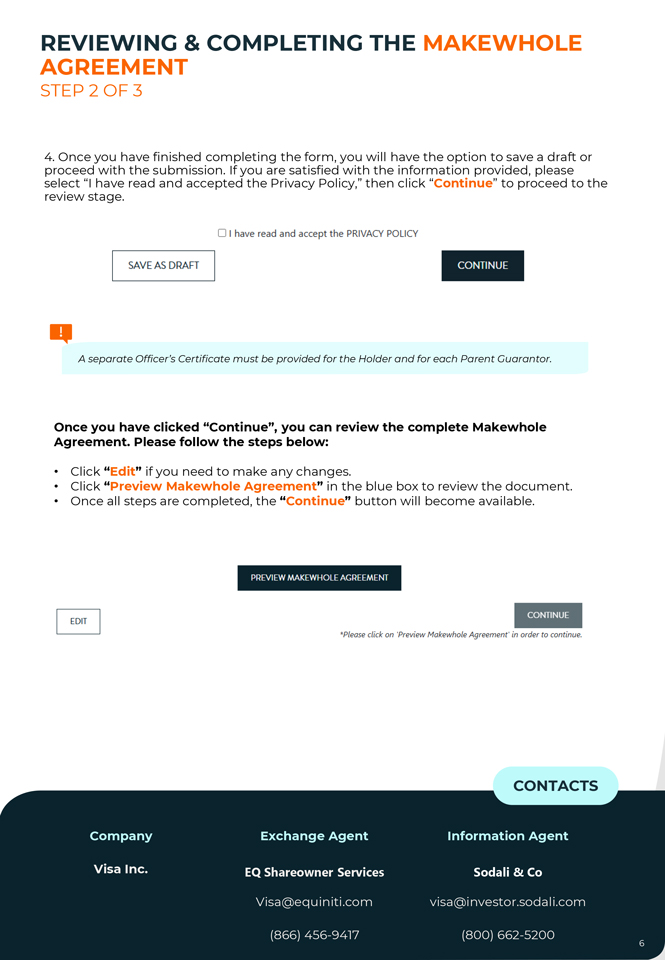
REVIEWING AGREEMENT & COMPLETING THE MAKEWHOLE STEP 2 OF 3 4. proceed Once you with have the submission. finished completing If you are the satisfied form, you with will the have information the option provided, to save please a draft or select review “I stage. have read and accepted the Privacy Policy,” then click “Continue” to proceed to the 0 I have read and accept t he PRIVACY POLICY SAVE AS DRAFT CONTINUE A separate Officer’s Certificate must be provided for the Holder and for each Parent Guarantor. Once you have clicked “Continue”, you can review the complete Makewhole Agreement. Please follow the steps below: • Click “Edit” if you need to make any changes. • Click “Preview Makewhole Agreement” in the blue box to review the document. • Once all steps are completed, the “Continue” button will become available. PREVIEW MAKEWHOLE AGREEMENT EDIT E+ii:Mi·ii ‘Please click on ‘Preview Makewhole Agreement’ in order to continue. CONTACTS Company Exchange Agent Information Agent Visa Inc. EQ Shareowner Services Sodali & Co Visa@equiniti.com visa@investor.sodali.com (866) 456-9417 (800) 662-5200 6
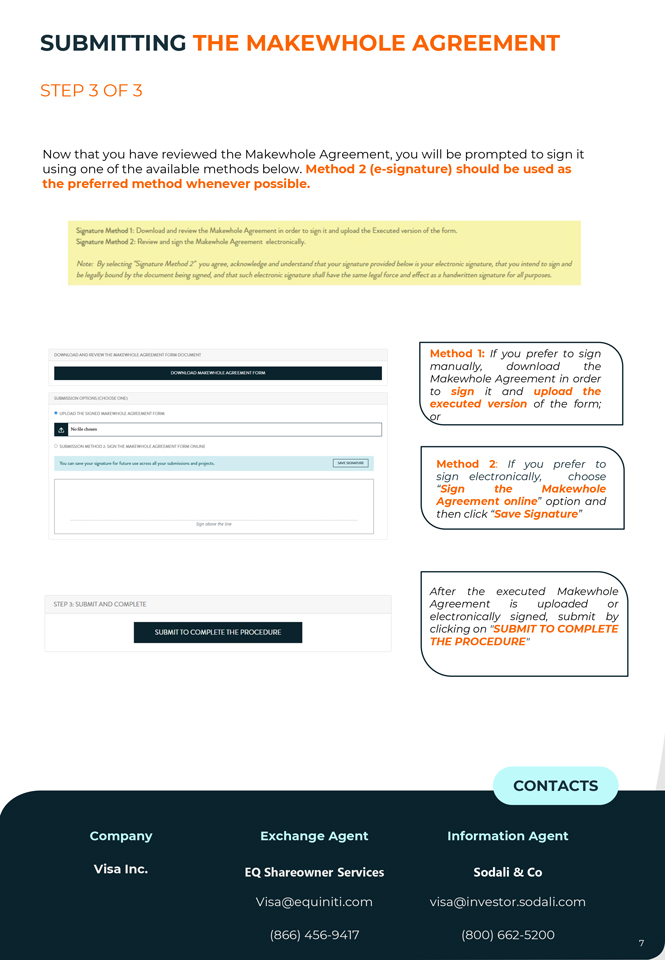
SUBMITTING THE MAKEWHOLE AGREEMENT STEP 3 OF 3 Now that you have reviewed the Makewhole Agreement, you will be prompted to sign it using one of the available methods below. Method 2 (e-signature) should be used as the preferred method whenever possible. Signature Method 1: Download and r-eview the Makewhole Agreement in or-det- to sign it and upload the Executed version of the fom:t. Signatur-e Method 2: Review and sign the Mal:.ewf’lole Agf’eement electronically. Note: By .selecting -Signature Method 2• you “agree, acknowledge and understand that your signature prowded “below ;s your electronic si.gnatare, that you inte(ld to sign and be legally bound by the document being s.rcned. and that such electronic signature shall have tbe same legal force and effect ;rs a handwritten signature for ,:1/1 purposes DOWNLOADE AND REVIEW THE MAKEWHOLE AGREEMENT FORM DOCUMENT (X)WNlOAJ) MAKCWHOI r A(,IHCMCNT HmM SUBMISSION OPTIONS {CHOOSE ONEJ • UPLOAD THE SIGNED MAKEWHOLE AGREEMENT rORM II Nofil~choun 0 SUBMISSION MErn002: SIGN THE MAKEWHOLE AGREEMENT rQRMONUNE YOtJ can...,.. your ‘lignatur~ for futur~ uw acrou all your ,ubrninion1 and pr~Kl1. Sign above the line STEP 3, SUBMIT AND COMPLETE SUBMIT TO COMPLETE THE PROCEDURE Method 1: If you prefer to sign manually, download the Makewhole Agreement in order to sign it and upload the executed version of the form; or Method 2: If you prefer to sign electronically, choose “Sign the Makewhole Agreement online” option and then click “Save Signature” After the executed Makewhole Agreement is uploaded or electronically signed, submit by clicking on “SUBMIT TO COMPLETE THE PROCEDURE” CONTACTS Company Exchange Agent Information Agent Company Exchange Agent Information Agent Visa Inc. EQ Shareowner Services Sodali & Co Visa Inc Equiniti Trust Company, LLC Sodali & Co Visa@equiniti.com visa@investor.sodali.com Visa@equiniti.com. visa@investor.sodali.com (866) 456-9417 (800) 662-5200
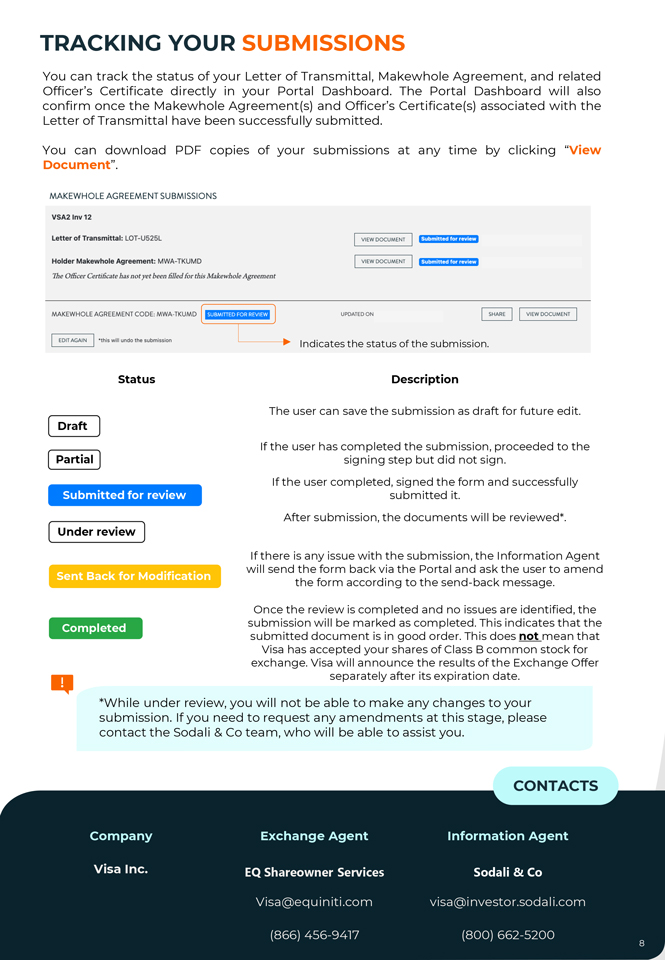
TRACKING YOUR SUBMISSIONS You can track the status of your Letter of Transmittal, Makewhole Agreement, and related Officer’s Certificate directly in your Portal Dashboard. The Portal Dashboard will also confirm once the Makewhole Agreement(s) and Officer’s Certificate(s) associated with the Letter of Transmittal have been successfully submitted. You can download PDF copies of your submissions at any time by clicking “View Document”. MAKEWHOLE AGREEMENT SUBMISSIONS VSA2 lnv12 Letter of Transmittal: LOT-U525L VIEW DOCUMENT ffj:fffi\ltilMffiittl Holder Makewhole Agreement: MWA-TKUM D VIEW DOCUMENT fitl®flit¥1¢1ffitt1 The Officer Certificate has not yet been filled for this Makewho/e Agreement MAKEWHOLE AGREEMENT CODE, MWA-TKUMD [ fi•IW11M•·llii1ial1 ] UPDATED ON ~I VIEW DOCUMENT I I EDIT AGAIN I •this will undo the submission I Indicates the status of the submission. Status Description The user can save the submission as draft for future edit. Draft If the user has completed the submission, proceeded to the Partial signing step but did not sign. If the user completed, signed the form and successfully Submitted for review submitted it. After submission, the documents will be reviewed*. Under review If there is any issue with the submission, the Information Agent will send the form back via the Portal and ask the user to amend Sent Back for Modification the form according to the send-back message. Once the review is completed and no issues are identified, the Completed submission will be marked as completed. This indicates that the submitted document is in good order. This does not mean that Visa has accepted your shares of Class B common stock for exchange. Visa will announce the results of the Exchange Offer separately after its expiration date. *While under review, you will not be able to make any changes to your submission. If you need to request any amendments at this stage, please contact the Sodali & Co team, who will be able to assist you. CONTACTS Company Exchange Agent Information Agent Visa Inc. EQ Shareowner Services Sodali & Co Visa@equiniti.com visa@investor.sodali.com (866) 456-9417 (800) 662-5200
Email: visa@investor.sodali.com Contact Center: (800) 662-5200 DUBLIN FRANKFURT LONDON MADRID PARIS ROME NEW YORK STAMFORD TORONTO HONG KONG MANLIA MELBOURNE PERTH SEOUL SYDNEY TOKYO BUENOS AIRES SAO PAULO
PARTICIPATION INSTRUCTIONS VISA INC. CLASS B STOCK EXCHANGE OFFER D) OFFICER’S CERTIFICATE VISA
INDEX IMPORTANT INFORMATION 3 ACCESSING THE OFFICER’S CERTIFICATE 4 REVIEWING & COMPLETING OFFICER’S CERTIFICATE 5 SUBMITTING OFFICER’S CERTIFICATE 7 TRACKING YOUR SUBMISSIONS 8
IMPORTANT INFORMATION Exchange Offer Overview Visa launched its first successive Exchange Offer for shares of its Class B-1 and B-2 common stock. Under the terms of the offer, holders of Class B-1 and Class B-2 common stock may exchange any and all of their outstanding shares of Class B common stock for a combination of Visa’s Class B-3 common stock, Visa’s Class C common stock and, where applicable, cash in lieu of fractional shares. To participate in the exchange offer, you must submit the required forms by one minute after 11:59 p.m., New York City time, on May 8, 2026, unless extended or earlier terminated by Visa. Settlement will be made promptly following the expiration date noted above. For more complete information regarding the Exchange Offer, including the risk factors that should be considered in connection with the Exchange Offer, please refer to the prospectus, which has been filed with the SEC and is available free of charge at www.sec.gov, Visa’s investor relations website at investor.visa.com, or by contacting Sodali & Co. at the details below. Visa Class B Exchange Offer Portal In the Visa Class B Exchange Offer Portal, you can review, download, complete, and submit online all required documents to participate in the Exchange Offer, including • The Letter of Transmittal; • The Makewhole Agreement; • The Officer’s Certificate; and • Any other document required in connection with the submission. You can also track your submissions directly and monitor their status at every stage of the process. Visa Class B Exchange Offer Portal Access To access the Visa Class B Exchange Offer Portal, you will receive a personalized email sent to your email address that Equiniti Trust Company, LLC, Visa’s Transfer Agent and the Exchange Agent for the Exchange Offer (EQ) has on record. The email will include a secure link to the Portal where you can log in and follow the on-screen instructions to review, complete and submit your documents. Please ensure you check your inbox and junk mail folders to avoid missing this message. CONTACTS Company Exchange Agent Information Agent Visa Inc. EQ Shareowner Services Sodali & Co Visa@equiniti.com visa@investor.sodali.com (866) 456-9417 (800) 662-5200
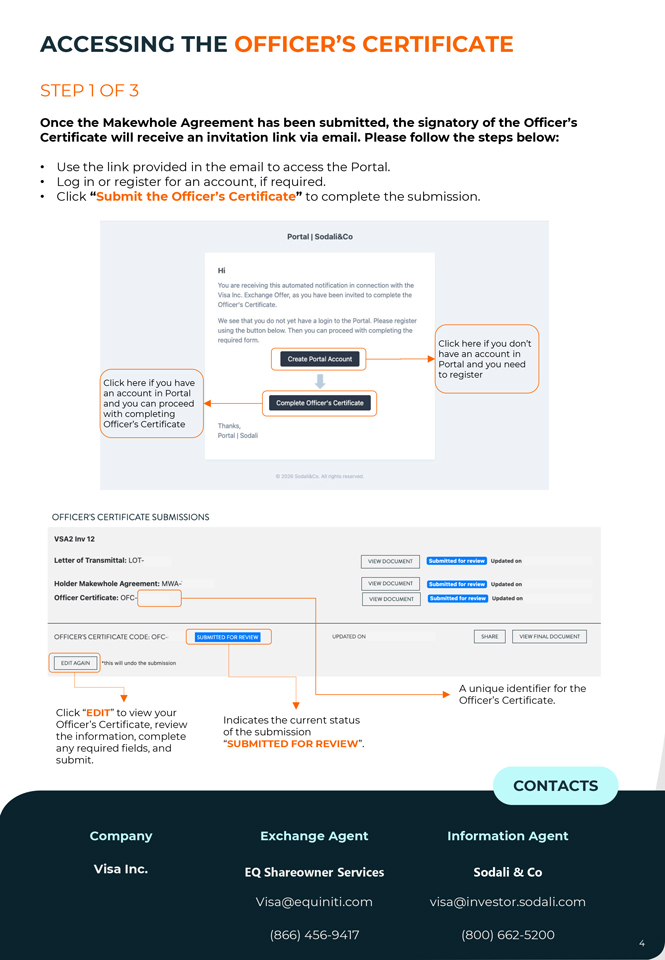
ACCESSING THE OFFICER’S CERTIFICATE STEP 1 OF 3 Once the Makewhole Agreement has been submitted, the signatory of the Officer’s Certificate will receive an invitation link via email. Please follow the steps below: • Use the link provided in the email to access the Portal. • Log in or register for an account, if required. • Click “Submit the Officer’s Certificate” to complete the submission. Portal I Sodali&Co Hi You are receiving this automated notification in connection with the Visa Inc. Exchange Offer, as you have been invited to complete the Officer’s Certificate. We see that you do not yet have a login to the Portal. Please register using the button below. Then you can proceed with completing the required form. Click here if you don’t Create Portal Account have an account in Portal and you need Click here if you have to register an account in Portal and you can proceed Complete Officer’s Cert1f1cate with completing Officer’s Certificate Thanks, Portal I Sodali 026 S01 &1 All ngh•s reserv1 ‘1. OFFICER’S CERTIFICATE SU BMISSIONS VSA2 lnv12 Letter of Transmittal: LOT- VIEW DOCUMENT (fj/jffljjf¥1[o)l4 jjJ I Updated on Holder Makewhole Agreement: MWA-· VIEW DOCUMENT f-JtjfftifjitflttfltMO, Updated on Officer Certificate: OFC- VIEW DOCUMENT fJj@jjj@fMfftt@ Updat ed on OFFICER’S CERTIFICATE CODE, OFC- liMil,ii·ii·ili,biii UPDATED O N ~I VIEWFINALDOCUMENT I I EDIT AGAIN I ·this will undo the submission A unique identifier for the Officer’s Certificate. Click “EDIT” to view your Officer’s Certificate, review Indicates the current status the information, complete of the submission any required fields, and “SUBMITTED FOR REVIEW”. submit. CONTACTS Company Exchange Agent Information Agent Visa Inc. EQ Shareowner Services Sodali & Co Visa@equiniti.com visa@investor.sodali.com (866) 456-9417 (800) 662-5200 4
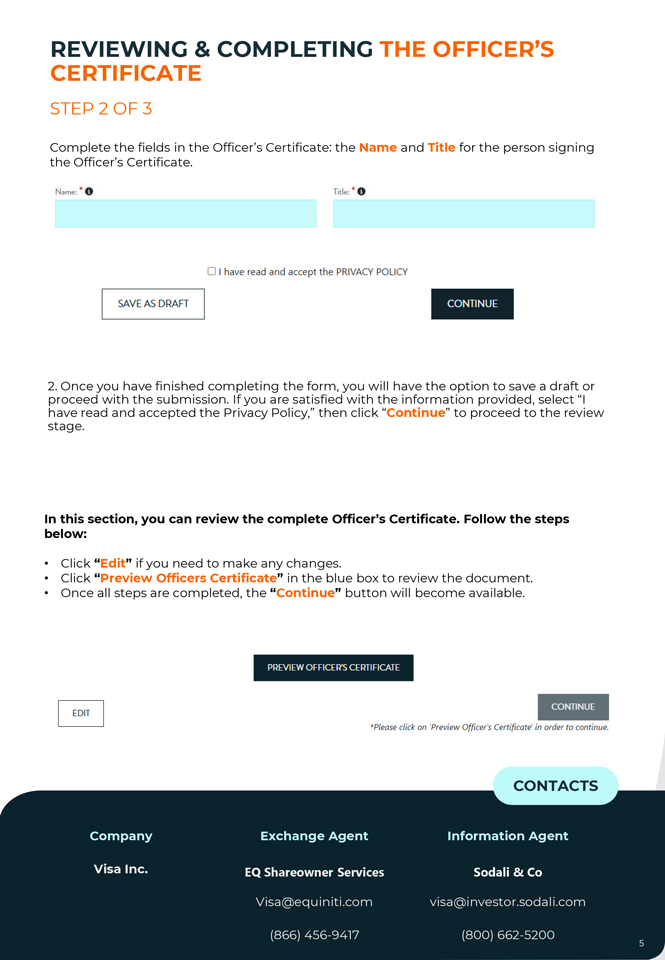
REVIEWING CERTIFICATE & COMPLETING THE OFFICER’S STEP 2 OF 3 Complete the fields in the Officer’s Certificate: the Name and Title for the person signing the Officer’s Certificate. Name, • C, Title: • 0 0 I have read and accept the PRIVACY POLICY SAVE AS DRAFT CONTINUE 2. proceed Once you with have the finished submission. completing If you are the satisfied form, you with will the have information the option provided, to save select a draft “I or stage. have read and accepted the Privacy Policy,” then click “Continue” to proceed to the review In this section, you can review the complete Officer’s Certificate. Follow the steps below: • Click “Edit” if you need to make any changes. • Click “Preview Officers Certificate” in the blue box to review the document. • Once all steps are completed, the “Continue” button will become available. PREVIEW OFFICER’S CERTIFICATE M·itwii’ii *Please click on ‘Preview Officer’s Certificate’ in order to continue. CONTACTS Company Exchange Agent Information Agent Visa Inc. EQ Shareowner Services Sodali & Co Visa@equiniti.com visa@investor.sodali.com (866) 456-9417 (800) 662-5200
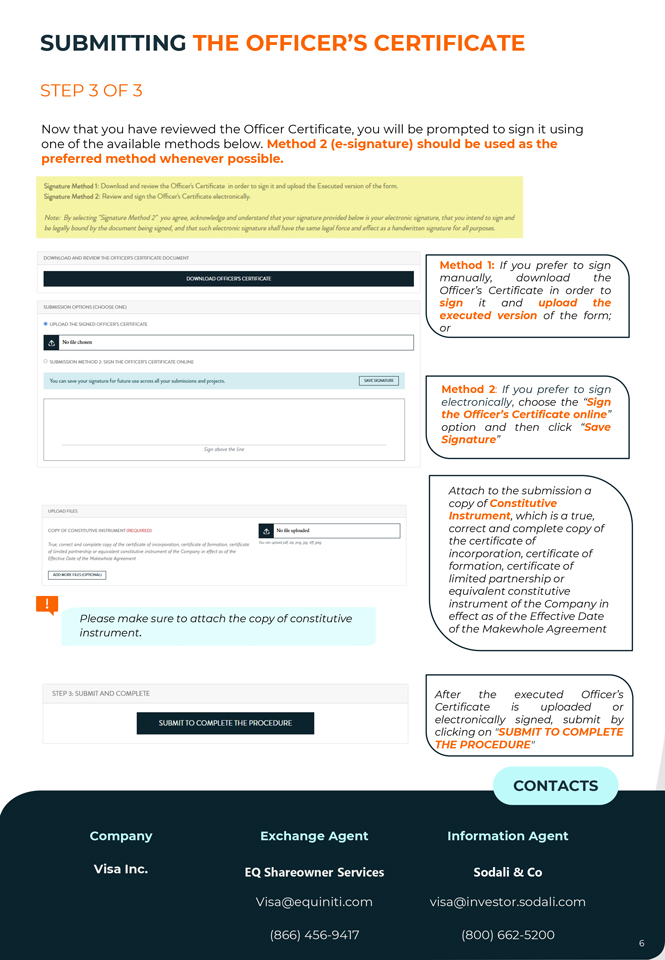
SUBMITTING THE OFFICER’S CERTIFICATE STEP 3 OF 3 Now that you have reviewed the Officer Certificate, you will be prompted to sign it using one of the available methods below. Method 2 (e-signature) should be used as the preferred method whenever possible. Signature Method 1: Download and review the Officer’s. Certificate in order to s.(gn it and upload the Executed vers.ion of the form. Signature Method2! Review a11d si,gn tl:u;i Officer’s U!rtificate electronically. I ‘L Note: By selecting “Signatµre Method 2 ~ you agree, ac*nowledge ;md understand that your signature provided below is your electronic signature, that you intend to sign and be legally bound by the document beir,g5ign“ed, ,md that such e!E>Gtronic signature shall have the same /~al force and effect as a handwritten sigruturP for all purposes. DOWNLOAD ANO REVIEW Tl-IE OFFICER“SCERTIFICATE DOCUMENT Method 1: If you prefer to sign OOWN LOAD OFFICER“S CERTIFICATE manually, download the Officer’s Certificate in order to sign it and upload the SUBMISSION OPTIONS (CIK>OSE ONE) executed version of the form; @ UPLOAD THE SIGNED OFFICERS CERTIFICATE or ¦ Nofikchasen 0 S.UBMIS.SION METHOD 2: SIGN THE OFFICER“S CERTIFICATE ONLINE You tan ~Y’II your i ignatun1 foc fut ur11 uw acrO’lii .,11 your submii1ions and pro_jllcts. I SAVt:SIGNATURE I Method 2: If you prefer to sign electronically, choose the “Sign the Officer’s Certificate online” option and then click “Save Signature” Signabovr:-t~line Attach to the submission a copy of Constitutive Instrument, which is a true, COPY Of CONSTITUTIVE INSTRUMENT (REQUIRED) II Nolik-uploaded correct and complete copy of True, corrn:t and camplae copy of~ certificatt of inrorporotion, certificate at formation, certrfkate the certificate of of /imittd partnership er equivalent constituti~ instrument at the Compony in~os of the incorporation, certificate of E(fech~ Date of the Makewhole Agreement formation, certificate of I ADOMOR£rl.ES[()POOtWJ I limited partnership or equivalent constitutive instrument of the Company in Please make sure to attach the copy of constitutive effect as of the Effective Date instrument. of the Makewhole Agreement STEP 3, SUBMIT AND COMPLETE After the executed Officer’s Certificate is uploaded or SUBMIT TO COMPLETE THE PROCEDURE electronically signed, submit by clicking on “SUBMIT TO COMPLETE THE PROCEDURE” CONTACTS Company Exchange Agent Information Agent Visa Inc. EQ Shareowner Services Sodali & Co Visa@equiniti.com visa@investor.sodali.com (866) 456-9417 (800) 662-5200
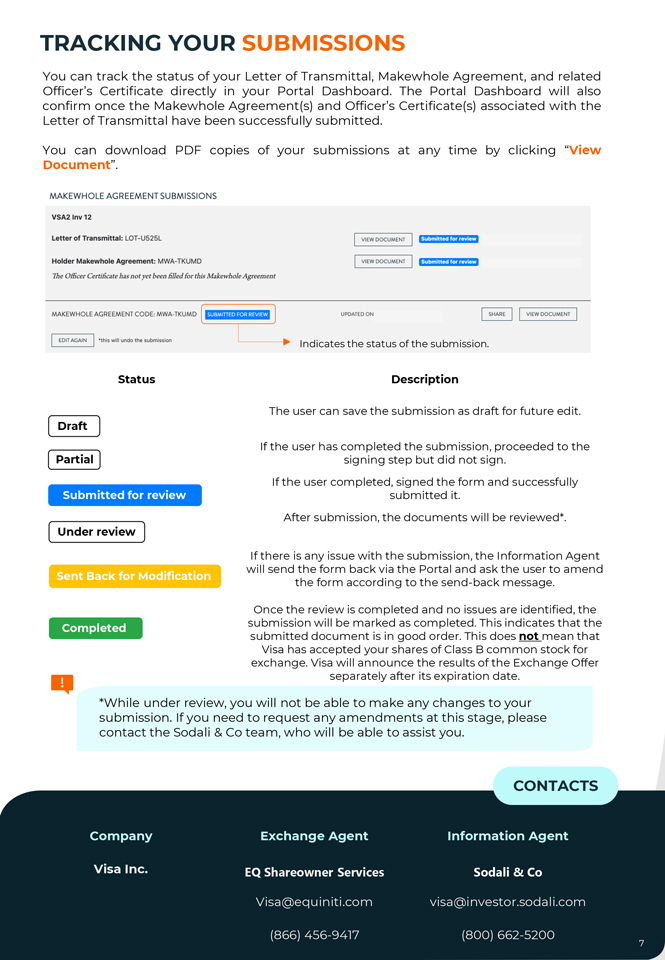
TRACKING YOUR SUBMISSIONS You can track the status of your Letter of Transmittal, Makewhole Agreement, and related Officer’s Certificate directly in your Portal Dashboard. The Portal Dashboard will also confirm once the Makewhole Agreement(s) and Officer’s Certificate(s) associated with the Letter of Transmittal have been successfully submitted. You can download PDF copies of your submissions at any time by clicking “View Document”. MAKEWHOLE AGREEMENT SUBMISSIONS VSA2 lnv12 Letter of Transmittal: LOT-U525L VIEW DOCUMENT ffj:fffi\ltilMffiittl Holder Makewhole Agreement: MWA-TKUM D VIEW DOCUMENT fitl®flit¥1¢1ffitt1 The Officer Certificate has not yet been filled for this Makewho/e Agreement MAKEWHOLE AGREEMENT CODE, MWA-TKUMD [ fi•IW11M•·llii1ial1 ] UPDATED ON ~I VIEW DOCUMENT I I EDIT AGAIN I •this will undo the submission I Indicates the status of the submission. Status Description The user can save the submission as draft for future edit. Draft If the user has completed the submission, proceeded to the Partial signing step but did not sign. If the user completed, signed the form and successfully Submitted for review submitted it. After submission, the documents will be reviewed*. Under review If there is any issue with the submission, the Information Agent will send the form back via the Portal and ask the user to amend Sent Back for Modification the form according to the send-back message. Once the review is completed and no issues are identified, the Completed submission will be marked as completed. This indicates that the submitted document is in good order. This does not mean that Visa has accepted your shares of Class B common stock for exchange. Visa will announce the results of the Exchange Offer separately after its expiration date. *While under review, you will not be able to make any changes to your submission. If you need to request any amendments at this stage, please contact the Sodali & Co team, who will be able to assist you. CONTACTS Company Exchange Agent Information Agent Visa Inc. EQ Shareowner Services Sodali & Co Visa@equiniti.com visa@investor.sodali.com (866) 456-9417 (800) 662-5200
Email: visa@investor.sodali.com Contact Center: (800) 662-5200 NEW YORK STAMFORD TORONTO DUBLIN FRANKFURT LONDON MADRID PARIS ROME BUENOS AIRES SAO PAULO HONG KONG MANILA MELBOURNE PERTH SEOUL SYDNEY TOKYO